Automation

Replacing SSL certificates for vRealize Orchestrator Appliance

It’s a common practice to replace self-signed certificates, that are used in several VMware products, with CA signed certificates. I did this in my lab for my vCenter Server Appliance and my VMware Update Manager. While I was working with vRealize Orchestrator I noticed, that it is also using self-signed certificates (what else?). For completeness, I decided to replace the self-signed certificates with CA signed.

My lab environment

  1. VMware vSphere 5.5 environment running a vCenter Server appliance (already using CA signed certificates)
  2. vRealize Orchestrator Appliance 5.5.2 (not version 5.5.2.1,  because I had problems with this release)
  3. Microsoft Windows CA running on a Windows 2012 R2 Standard server

You don’t need a Microsoft Windows CA. You can use any other CA. There is no need to use a special vendor. I use a windows-based CA in my lab, so the screenshots reflect this fact. The way how certificates are replaced differs between vRealize Orchestrator Appliance and the windows-based standalone or vCenter Server embedded version. If you use the in the vCenter Server embedded or Standalone Orchestrator check Derek Seamans VMware vSphere 5.5 SSL Toolkit. I used the Orchestrator appliance.

Automating updates during MDT 2013 Lite-Touch deployments

I use Microsofts Deployment Toolkit (MDT) in my lab to deploy Windows VMs with Windows Server 2008 and Windows Server 2012. I described the installation and configuration of MDT in a small blog post series. Take a look into the intro post, if you’re a new to MDT. But the OS installation isn’t the time consuming part of a deployment: It’s the installation of patches. Because of this, I decided to automate the patch installation and make it part of the OS installation.

Power on HP ProLiant servers with iLO, SSH & Plink

Some weeks ago, Frank Denneman wrote a short blog post about accessing his Supermicro IPMI with SSH. He used this access to power on his lab servers.I don’t use Supermicro boards in my lab, but I have four HP ProLiants with iLO and iLO has a also a SSH interface. This way to power on my servers seemed very practical, especially because the iLO web interface isn’t the fastest. But I wanted it a bit more automated, so I decided to use Plink to send commands via SSH.

Load VMware PowerCLI snap-in automatically in PowerShell ISE

The PowerShell Integrated Scripting Environment (ISE) is a very handy application when dealing with the PowerShell. And because of this, the ISE is also a very handy application when dealing with VMware PowerCLI. When I write a script or a one-liner, one of the first things I do is to load the necessary snap-ins. And because I’m lazy, I’m trying to automate everything, what I have to do more than once. So how can I load the necessary snap-ins automatically when starting PowerShell ISE? The Windows PowerShell profile will help you. This is a simple text file, or to be more precise, a PowerShell script. Because of this, you can write everything (cmdlets, scripts, functions etc.) in this script file, and it will be executed when you start the PowerShell or the PowerShell ISE. Please note, that there are two profile files: One for the PowerShell and one for the PowerShell ISE. But where can you find the Windows PowerShell profile files? The path to the PowerShell profile is returned by the built-in variable $profile.

Change network adapter type with PowerCLI

Today I found this neat PowerCLI One-liner in my Twitter timeline:

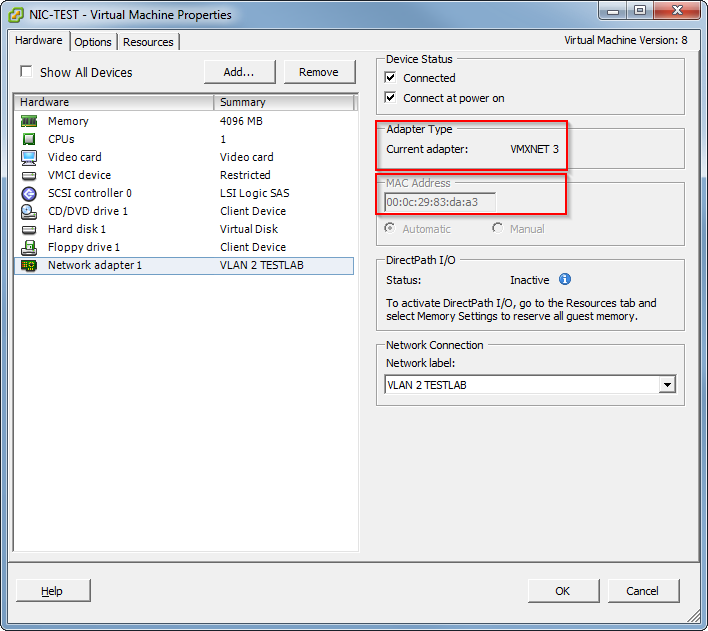
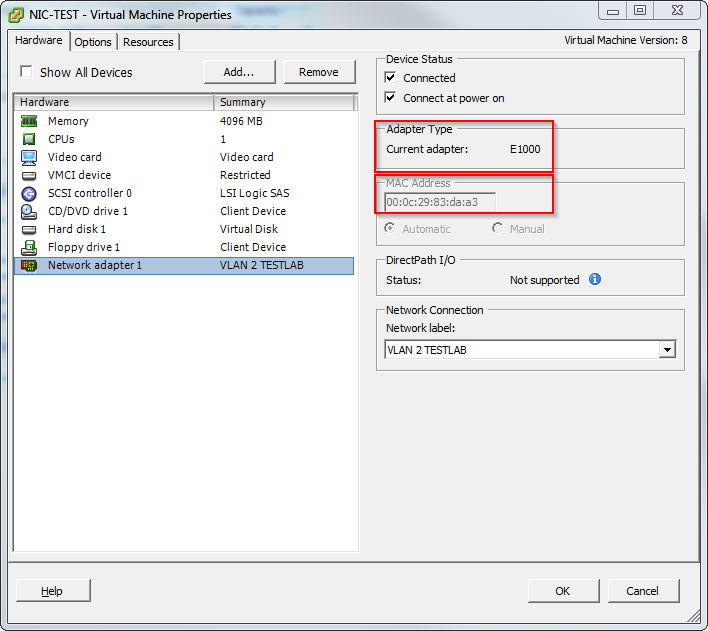
A nice side effect of this one-liner is, that the mac-address doesn’t change, as you can see in the screenshots.

Patrick Terlisten/ vcloudnine.de/ Creative Commons CC0

Patrick Terlisten/ vcloudnine.de/ Creative Commons CC0

Patrick Terlisten/ vcloudnine.de/ Creative Commons CC0

Patrick Terlisten/ vcloudnine.de/ Creative Commons CC0

Deploying Windows Server VMs with Microsoft Deployment Toolkit 2013 - Part II

After installing the required software, we need to configure MDT 2013. You need:

  • Windows Server 2008 R2 ISO
  • VMware Tools for Windows ISO or a Server with VMware Tools installed

The deployment share

First of all we have to create a deployment share. This file share is used to access the software, drivers etc. during the deployment phase. Just start the Deployment Workbench, that can be found in the start menu. Right click the menu item “Deployment Shares” and click “New Deployment Share”.

Deploying Windows Server VMs with Microsoft Deployment Toolkit 2013 - Intro

Usually you can install virtual servers on four different ways:

  • Installation from scratch
  • image-based installations (e.g. Clonezilla)
  • VMware templates and template customization specifications
  • automated deployment

Except VMware templates you can use every technique to deploy physical and virtual servers. I would like to show you how you can install windows-based VMs with Microsofts Deployment Toolkit 2013 (MDT 2013). There are three articles in this series. The first article describes what you need for MDT 2013 and how you install WDS. The second article will show you how to configure MDT 2013, import the necessary drivers and OS images. The third article describes how to deploy a Windows 2008 R2 server with VMware Tools.

Deploying Windows Server VMs with Microsoft Deployment Toolkit 2013 - Part I

What are the requirements of MDT 2013?

The requirements are manageable. To recreate my small lab environment, you need two VMs or physical servers and a evaluation copy of Windows 2008 R2. MDT 2013 and ADK for Windows 8.1 can be downloaded for free on microsoft.com. I used two Windows 2008 R2 VMs for my setup. One VM as a Domain Controller with DHCP and the second VM for MDT 2013 and WDS.

Backup DataCore SANsymphony-V config using PowerShell

In November 2013 I published a PowerShell script on blazilla.de that creates a backup of your SANsymphony-V config by using the DataCore SANsymphony-V PowerShell cmdlets. I would like to thank Marcel, Michael and Frank for their feedback and comments to improve the script. The password is stored in the securestring.txt that needs to be stored in the same directory as the script. Kudos to Marcel, who has the part of the script contributed, that stores the password in an encrypted file.