Vmware

vExpert 2014 benefits

In addition to the benefits that VMware grants to vExperts, a couple of vendors grant also benefits to vExperts. This includes free licenses, subscriptions or other offers. This is only a loose compilation of vExperts benefits.

Vendor Offer Link
Solarwinds Virtualization Manager NFR http://bit.ly/1gYJtBB
Veeam Backup & Replication NFR http://bit.ly/1esRaFn
Pluralsight Annual Plus Subscription http://bit.ly/1esTa0o
Tintri Polo Shirt http://bit.ly/1eJqgE2
Devolutions Remote Desktop Manager 1y NFR http://bit.ly/1iRVXfm
Login VSI VIP program http://bit.ly/1esPY4M
Hewlett-Packard StoreVirtual VSA NFR http://bit.ly/1m4J6gt
Darren Woollard Sticker & URL Shortener http://bit.ly/1noB4gb
DataCore SANsymphony-V NFR http://bit.ly/1iUXd2N
Proximal Data AutoCache NFR http://bit.ly/1eLKoWa
VSS Labs vCert Manager NFR http://bit.ly/1eTncKP
Unitrends Enterprise Backup for VMware or Hyper-V NFR http://bit.ly/1eWqn4Q
Symantec Backup Exec V-Ray Edition NFR http://bit.ly/1eTFcEO
Royal TS Royal TS/X NFR http://bit.ly/1jtpNbB

I also recommend to check the following blog post:

VMware vExpert 2014

The VMware vExperts program is a annual given title from VMware to individuals who have significantly contributed to the community. It’s an award for sharing their knowledge with the community. It’s a nice way to say “Thank you” from VMware.

There are three different tracks you can apply:

The Evangelist Path is for bloggers, authors and other members of the community, who demonstrate their passion and knowledge.

The Customer Path is for customers. This includes leaders of VMware customer organizations, like the VMware User Groups (VMUG), speakers, customers who helped to create customer success stories etc.

Support of HP OEM VMware bundles on non HP Hardware

Hewlett-Packard (HP) offers a broad range of OEM VMware software for their HP ProLiant server familiy (VMware Virtualization Software and Client Virtualization with VMware View and VMware ThinApp). A customer can buy HP ProLiant servers and VMware software from HP. This also includes support for hard- and software, which makes it easy in case of support. You only have to call HP and they will do the rest. As you maybe know, I work for a IT solution provider and HP partner. It’s quite common, that a solution which is offered by us, consists of a large set of HP hard- and software. This has benefits for both sides: For us, and the customer, especially from the support perspective. The customer has a multi-vendor solution (HP and VMware), but support is done by HP. The other side of the medal is the financial perspective: The higher the project value, the better the discounts from HP. So it’s quite common that we sell HP OEM VMware licenses and support.

Enable CDP on VMware vSS

The Cisco Discovery Protocol (CDP) is used to discover and advertise the identity and capabilities of a network component to other networking components. CDP a proprietary protocol developed by Cisco, so it’s often used on Cisco switches and routers. The Link Layer Discovery Protocol (LLDP) is a vendor-neutral discovery protocol, which is used e.g. by Hewlett-Packard. With CDP or LLDP you can easily get an overview over a network topology. You can quickly check, e.g. what switches are connected to an uplink. Both protocols use Ethernet Multicast to advertise and receive information. CDP usess the address 01:00:0C:CC:CC:CC, LLDP 01:80:C2:00:00:0E.

Launch vCenter (Web) Client in localized language

This is more a note to myself, than really new content. Due compatibility to a lot of installed software, I use a german localized Windows 7 installation. This leads to the “problem” that VMware vSphere Client and VMware Web Client launch german localized. This annoys me. I want that my VMware vSphere (Web) Clients talks dirty to me. VMware KB article 1016403 describes the procedure to force a specific localization.

VMware vSphere Client

Load VMware PowerCLI snap-in automatically in PowerShell ISE

The PowerShell Integrated Scripting Environment (ISE) is a very handy application when dealing with the PowerShell. And because of this, the ISE is also a very handy application when dealing with VMware PowerCLI. When I write a script or a one-liner, one of the first things I do is to load the necessary snap-ins. And because I’m lazy, I’m trying to automate everything, what I have to do more than once. So how can I load the necessary snap-ins automatically when starting PowerShell ISE? The Windows PowerShell profile will help you. This is a simple text file, or to be more precise, a PowerShell script. Because of this, you can write everything (cmdlets, scripts, functions etc.) in this script file, and it will be executed when you start the PowerShell or the PowerShell ISE. Please note, that there are two profile files: One for the PowerShell and one for the PowerShell ISE. But where can you find the Windows PowerShell profile files? The path to the PowerShell profile is returned by the built-in variable $profile.

VMware VCP certification has now an expiration date

This morning a tweet from Josh Coen (VCDX #129) shocked me a bit:

So far the VMware certification had no expiration date. If you had a VCP for ESX2, this was still valid up to today. I quickly checked my VMware Training account and noticed a tiny exclamation mark above my certifications.

Patrick Terlisten/ vcloudnine.de/ Creative Commons CC0

Patrick Terlisten/ vcloudnine.de/ Creative Commons CC0

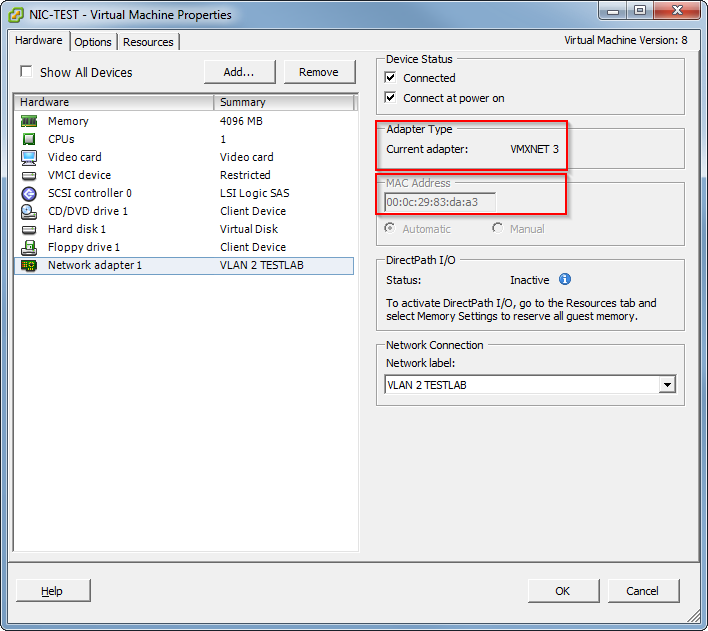
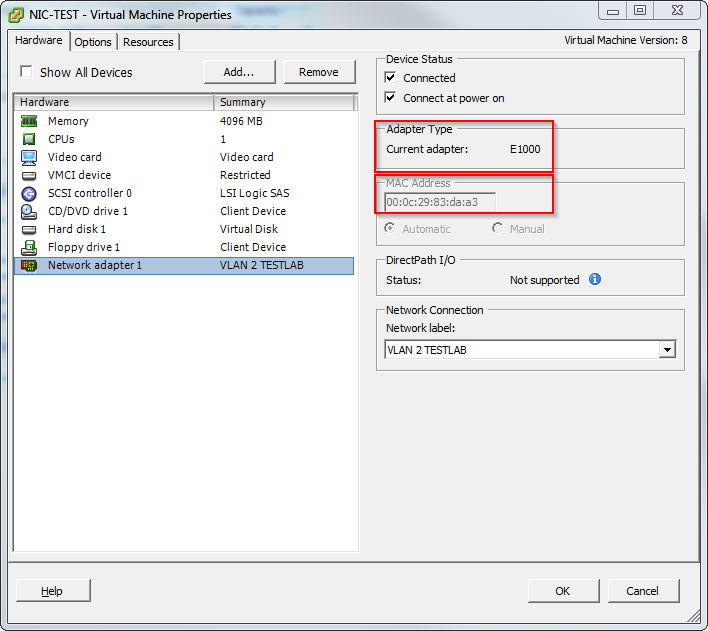
Change network adapter type with PowerCLI

Today I found this neat PowerCLI One-liner in my Twitter timeline:

A nice side effect of this one-liner is, that the mac-address doesn’t change, as you can see in the screenshots.

Patrick Terlisten/ vcloudnine.de/ Creative Commons CC0

Patrick Terlisten/ vcloudnine.de/ Creative Commons CC0

Patrick Terlisten/ vcloudnine.de/ Creative Commons CC0

Patrick Terlisten/ vcloudnine.de/ Creative Commons CC0

Useful stuff about Nutanix

Nutanix was founded in 2009 and left the stealth mode in 2011. Their Virtual Computing Platform combines storage and computing resources in a building block scheme. Each appliance consists up to four nodes and local storage (SSD and rotating rust). At least three nodes are necessary to form a cluster. If you need more storage or compute resources, you can add more appliances, and thus nodes, to the cluster (scale out). Nutanix scales proportionately with cluster growth. The magic is not the hardware - it’s the software. The local storage resources of each appliance are passed to the Nutanix Controller VM (CVM). The CVM services I/O and storage to the VMs and is running on each node, regardless of the hypervisor. You can run VMware ESXi, Microsoft Hyper-V and KVM on the nodes. Although the Nutanix Distributed File System (NDFS) is stretched across all nodes, I/O for a VM is served by the local CVM. The storage can be presented via iSCSI, NFS or SMB3 to the hypervisor.

Windows Server 2012 Cluster with VMware vSphere 5.1/ 5.5

While I was poking around in my Twitter timeline, a tweet from Victor van den Berg (VCDX #121) got my attention.

My first though “What a step backwards!”. I have installed a bunch of Microsoft clusters in Virtual Infrastructure and vSphere enviroments and most times it was PITA. Especially with Raw Device Mappings (RDM) and bus sharing, which prevents vMotion a VM to another host (regardless of this: it’s not supported!). It’s ironic to invest a significant amount of money into a technology, which  increases availability and manageability, and another technology lowers availability due additional maintenance windows for cluster failovers. But that’s exactly what you get, when you use MSCS with SCSI bus sharing (RDM or VMFS). A way to address this issue is to use in-guest iSCSI. This means that you access the shared disks directly from the VM due a iSCSI initiator running in the VM. To do so, you have to present the disks for the cluster to the VMs, not to the ESXi hosts. To be honest: In-guest increases complexity. Especially then, when the customer doesn’t have a iSCSI infrastructure. A second method is in-guest SMB, which is currently only supported with Windows Server 2012. Just to clear up the matter with in-guest iSCSI and W2K12(R2). Mostafa Khalil provided the crucial information: