Posts

Automating ESXi configuration for DataCore SANsymphony-V

DataCore describes in their Host Configuration Guide for VMware ESXi some settings that must be adjusted before storage from DataCore SANsymphony-V storage servers will be assigned to the ESXi hosts. Today, for ESXi 5.x and 6.0, you have to add a custom rule and adjust the advanced setting DiskMaxIOSize. For ESX(i) 4 more parameters had to be adjusted. But I will focus on  ESXi 5.x and 6.0. You need to adjust these settings for each host that should get storage mapped from a DataCore storage server. If you have more then one host, you may have the wish to automate the necessary steps. The check the current value of DiskMaxIOSize, you can use this lines of PowerCLI code.

Use Windows MPIO for DataCore backend storage connections

When you install DataCore SANsymphony-V (SSV), you will be asked during the setup to allow the installation of some special drivers. DataCore SANSymphony-V needs this drivers to act as a storage target for hosts and other storage servers. Usually you have three different port roles in a DataCore SSV setup:

  • Frontend Ports (FE)
  • Mirror Ports (MR)
  • Backend Ports (BE)

Frontend (FE) ports act only in target-only mode. These ports will be disabled, if you stop a DataCore storage server. Mirror (MR) ports (can) act as target AND initiator. You can set (if you like) a mirror port to a specific mode (target or initiator), but I wouldn’t recomment this. Theoretically you can set one MR port to act as initiator, and a second to target-only mode. If the port is set to target-only, the port is also stopped when the DataCore storage server is stopped. A backend (BE) port acts as initiator for backend storage. Usually the FE ports act as target-only, the MR as target/ initiator and the BE ports as initiator-only. If you use local storage (or SAS connected), there will be no BE ports.

First experience: Nexsan E-Series

One of my longtime DataCore customers has started a project to replace their current DataCore storage servers and backend storage with new hardware. In opposite of the current setup, the newly installed backend storage is now FC-attached. The customer has selected Nexsan E-Series E32V, E32XV and E48V storage systems in combination with DataCore SANsymphony-V10.

Who is Nexsan?

The question should be: Who is Imation? Nexsan was founded in 1999 in Derby, England, but was aquired by Imation in December 2012. Since December 2012, Nexsan is one of Imations brands and offers, as a storage-only company, three different product lines: Assureon Secure StorageE-Series High Density Storage and NST Hybrid Storage.

Chicken-and-egg problem: 3PAR VSP 4.3 MU1 & 3PAR OS 3.2.1 MU3

Since monday I’m helping a customer to put two HP 3PAR StoreServ 7200c into operation. Both StoreServs came factory-installed with 3PAR OS 3.2.1 MU3, which is available since July 2015. Usually, the first thing you do is to deploy the 3PAR Service Processor (SP). These days this is (in most cases) a Virtual Service Processor (VSP). The SP is used to initialize the storage system. Later, the SP reports to HP and it’s used for maintenance tasks like shutdown the StoreServ, install updates and patches. There are only a few cases in which you start the Out-of-the-Box (OOTB) procedure of the StoreServ without having a VSP. I deployed two (one VSP for each StoreServ) VSPs, started the Service Processor Setup Wizard, entered the StoreServ serial number and got this message:

Microsoft Exchange 2013 shows blank ECP & OWA after changes to SSL certificates

This issue is described in KB2971270 and is fixed in CU6.

I ran a couple of times in this error. After applying changes to SSL certificates (add, replace or delete a SSL certificate) and rebooting the server, the event log is flooded with events from source “HttpEvent” and event id 15021. The message says:

An error occurred while using SSL configuration for endpoint 0.0.0.0:444. The error status code is contained within the returned data.

DataCore mirrored virtual disks full recovery fails repeatedly

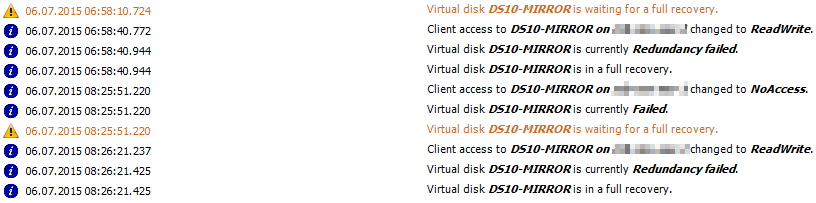
Last sunday a customer suffered a power outage for a few hours. Unfortunately the DataCore Storage Server in the affected datacenter weren’t shutdown and therefore it crashed. After the power was back, the Storage Server was started and the recoveries for the mirrored virtual disks started. Hours later, three mirrored virtual disks were still running full recoveries and the recovery for each of them failed repeatedly.

Patrick Terlisten/ vcloudnine.de/ Creative Commons CC0

Patrick Terlisten/ vcloudnine.de/ Creative Commons CC0

Windows guest customization fails after cloning a VM

Last week I got a call from a customer. The customer has tried to deploy new Citrix XenApp servers, and because the VMware template was a bit outdated, he tried to clone a provisioned and running Citrix XenApp VM. During this, the customer applied a guest customization specification to customize the guest OS (IP address, hostname etc). Until this point everything was fine. But after the clone process, the guest customization started, but never finished.

FVP Freedom: Get Pernix'd for free

PernixData is one of the presenting sponsors at the Virtualization Field Day 5 (VFD5). One of the four key announcements is FVP Freedom.

FVP Freedom will be available in the Fall of 2015 and it’s a completely free version of PernixData FVP. Of course, the functionality is limited. FVP Freedom will only support a single cluster, but with an unlimited number of VMs. Instead of SSDs, FVP Freedom will support up to 128 GB of DFTM (Distributed Fault Tolerant Memory) per cluster. FVP Freedomm will be completely community supported.

Juniper launches Design Certification Track

This tweet from @JuniperCertify has caught my attention:

Later that day, I got an e-mail from Juniper with the same announcement. Juniper has launched its Design Certification Track inside the Juniper Networks Certification Program (JNCP) and the Juniper Networks Certified Design Associate (JNCDA) is the first available certification.

The new Design Certification Track

A picture says more than a thousands words (… I found this in the blog post “Juniper Networks New Network Design Curriculum and Certifications” on the Juniper “My Certification Journey” blog):