
Posts

Active Directory property homeMDB is not writeable on recipient

During an Exchange 2013 migration project the  first attempt to migrate a mailbox failed with the following error:

Error: MigrationPermanentException: Active Directory property 'homeMDB' is not writeable on recipient 'testing.local/Users/Dummy'. --> Active Directory property 'homeMDB' is not writeable on recipient 'testing.local/Users/Dummy'.

The error message clearly stated, that this was a permission issue. A quick search pointed me to the right direction. I found a thread in the TechNet forums, in which the same error message were discussed. This error occurs, if the Exchange Trusted Subsystem group is missing in the ACL of the user object. This group contains the exchange server and it’s usually inherited from the domain object to all child containers and objects. I checked the ACL of the user and the Exchange Trusted Subsystem group was missing in the ACL. This was caused by the disabled permissions inheritance. An object ACL with disabled permissions inheritance is sometimes called a protected ACL. Bill Long wrote a nice Power Shell script to search for object which have permissions inheritance disabled.
Exchange 2013: Event ID 2937 MSExchange ADAccess after public folder migration

Problem description

I got a couple of warnings (source MSExchange ADAccess, Event ID 2937) after removing a Exchange 2007 server at the end of a Exchange 2007 > 2013 migration. The details of the warning told me, that there was a faulty value set to a attribute of the mailbox database object. Because the public folder migration was part of the migration, the error message seemed plausible.

Process w3wp.exe (PID=4652). Object [CN=Mailbox Database E2K13,CN=Databases,CN=Exchange Administrative Group (FYDIBOHF23SPDLT),CN=Administrative Groups,CN=Testing,CN=Microsoft Exchange,CN=Services,CN=Configuration,DC=testing,DC=local. Property [PublicFolderDatabase] is set to value [testing.local/Configuration/Deleted Objects/Public Folder Database DEL:4a45b7c2-10fc-42df-bdaa-82ae8a12e66e], it is pointing to the Deleted Objects container in Active Directory. This property should be fixed as soon as possible.

A quick check with ADSI Edit confirmed the message. To be honest: I made a mistake and searched for the attribute PublicFolderDatabase in the database object, but in the end I found the wrong entry as a value of the msExchHomePublicMDB attribute in the database object. It must be set to the distinguished name of the mailbox database that houses the public folder mailboxes. If you don’t have any public folders in your Exchange 2013 org, then you have to clear the value!

Sophos UTM Home Edition license expired

Sophos offers a free license of their UTM firewall for private use. The product was originally developed by Astaro and since these days I use it at home. After the merger with Sophos I switched to the new Sophos UTM 9, still using my old license. I use it to seperate my test VLAN from my normal VLAN, and I use it as proxy with antivirus scanning for all my devices (iPhone, iPad, laptop etc.), but the UTM can do a lot more than this. This morning I wanted to read my Twitter timeline on my iPhone but I got no connection over WLAN. After disabling the proxy it worked fine. I took a look at the admin interface of my UTM and what did I see? An expired license. WTF?!

Automating updates during MDT 2013 Lite-Touch deployments

I use Microsofts Deployment Toolkit (MDT) in my lab to deploy Windows VMs with Windows Server 2008 and Windows Server 2012. I described the installation and configuration of MDT in a small blog post series. Take a look into the intro post, if you’re a new to MDT. But the OS installation isn’t the time consuming part of a deployment: It’s the installation of patches. Because of this, I decided to automate the patch installation and make it part of the OS installation.

Patch available: VMware vSphere 5.5 U1 NFS APD bug

In April 2014 was a bug in vSphere 5.5 U1 discovered, which can lead to APD events with NFS datastores.iSCSI, FC or FCoE aren’t affected by this bug, but potentially every NFS installation running vSphere 5.5 U1 was at risk. This bug is described in KB2076392. Luckily none of my customers ran into this bug, but this is more due to the fact, that most of my customers use FC/ FCoE or iSCSI. Until today the only solution was to avoid the upgrade to U1 and to use vSphere 5.5 GA (with some patches to fix the Heartbleed bug).

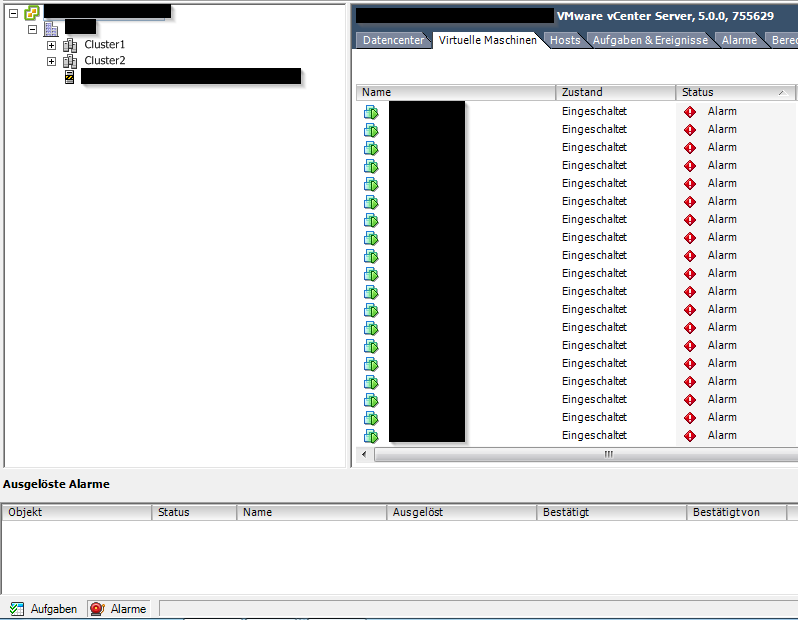
VM shows alarm - but no alarm triggered

Today I observed a strange behaviour of several VMs at a customer. Several VMs in a cluster showed an alarm, but neither on the alarm tab of the VM, nor the alarm section at the bottom of the C# client showed an error.

Patrick Terlisten/ vcloudnine.de/ Creative Commons CC0

Patrick Terlisten/ vcloudnine.de/ Creative Commons CC0

The customer still uses vSphere 5.0. An upgrade to 5.5 is on the roadmap. The symptoms:

TeamViewer Connection with Royal TS

Some of my customers use TeamViewer to provide a quick access to their systems, without the need to configure VPN connections, install software on hosts etc. TeamViewer provides fast and secure access without the need to install software. Simply start the teamviewer.exe and choose if you want to connect to a host or use the session id and password to allow someone else access your computer. TeamViewer is free for all non-commercial users! So it’s a great choice for remote support all your family members.

Configuring HP StoreOnce VSA and HP Data Protector for HP StoreOnce Catalyst

HP StoreOnce Catalyst is an enterprise-wide deduplication algorithm which is used in HP StoreOnce appliances, HP StoreOnce VSA and HP Data Protector. With StoreOnce Catalyst, deduplicated data can be moved between Catalyst capable devices without the need to rehydrate the data. Think about the backup in your remote location. You can move the deduplicated data to your central StoreOnce appliance in your HQ without rehydrating the data. This saves bandwidth and time. Or think about source-side deduplication, which means that a server deduplicates the data during the backup and sends the deduplicated data to the backup device. This saves bandwidth and increases the performance (with the downside of more cpu load on the server…).

Conflicting information: Setting iops option for VMW_PSP_RR for HP 3PAR StoreServ on ESXi

Yesterday I received the following tweet:

Later Craig Kilborn joined the conversation and I decided to clarify this 100 or 1 IOPS myth the next morning.

In order to give you some context: I wrote a blog post about adding a custom SATP claimrule for HP 3PAR StoreServ storage on ESXi. In this blog post I pointed out, that the claim rule is usually used to change the default behaviour for switching the path for active IO. For the VMW_PSP_RR this is 1000 IOPS, which means, that after 1000 IOPS for a specific device, the path for the active IO to this device ist changed to the next active and optimized IO path. I recommend to read this blog post from Duncan Epping for more information.

Royal TS - Remote connection management for Windows

Disclaimer: I use a NFR license that was provided to me as a vExpert by code4ward free of charge.

I have searched for a relatively long time for a solution to manage multiple remote connections, like RDP, VNC or SSH. I tried different free tools, but none of them fulfilled my requirements, which are quite simple: Manage different connections & credentials. First I’ve tried Devolutions Remote Desktop Manager, which was quite good. But to be honest: It was a bit too much for my needs. Justin Paul wrote a nice review of Remote Desktop Manager. The second product I’ve tested was more suitable: Royal TS for Windows.