
Posts

VCAP-DCV Design 2021 - Objective 1.1 Gather and analyze business requirements

This blog post covers objective 1.1 (Gather and analyze business requirements) of the VCAP-DCV Design 2021 exam. It is based on the VMware Certified Advanced Professional 6.5 in Data Center Virtualization Design (3V0-624) Exam Preparation Guide (last update December 2019).

When you get the task to design something , you will instinctively start gathering information about the requirements that have to be fulfilled. Everything IT is doing should support the business in some way.
VMware Certified Advanced Professional 6.5 – Data Center Virtualization Design Exam (VCAP-DCV Design 2021)

In August 2018 I’ve passed the VCAP6-DCV Deployment exam. After a busy first half of 2019 it’s time to start preparing the VMware Certified Advanced Professional — Data Center Virtualization Design 2019 exam. But I lost focus and in 2020 I had a lot to do - but not VMW related and so I also missed my goal to take the VCAP-DCV Design exam.

I have to push myself, so I decided to re-cap my half finished blog series to get myself back on track.

Two registry changes to improve physical Horizon View Agent experience

Using physical clients as Horizon View agents is pretty common for me. My office pc, as well as my Lenovo X250 are often used by using the Horizon View Client and the Blast protocol. But as good as the performance is, there were a couple of things that bugged me.

On my office pc, I encountered pretty often a black screen, either on first connect, or on reconnect. The typical issue caused by misconfigured firewall policies, but this was completly out of scope in this case, because my collegues never had issues with black screens. The problem occured with different versions of View Agent.

MFA disabled, but Azure asks for second factor?!

I just had a Teams call with a customer to resolve a strange mystery about Azure MFA.

The customer called me and explained, that he has a user with Azure Multifactor Authentication (MFA) disabled, but when he logs in with this account, he is asked to setup MFA. He setup MFA and was able to login according to their Conditional Access policies.

The customer and I took a look into their tenant and checked a couple of things. The first thing the customer showed me was this screen:

vCenter Server migration to 6.7 fails with "Failed to check VMware STS. The SSL certificate of STS service cannot be verified"

There are still customers out there that are running vCenter Server on a Windows host. This year, despite the fact that most customers have set project on hold, I managed some of them to migrate to a vCenter Server Appliance.

Some days ago I had an meeting with one of my favorite customers to migrate their vCenter Server 6.5 to a vCenter Server Appliance 6.7 U3l. They were still on 6.5 because of some legacy ESXi 5.5 hosts, but they managed it to remove them from their vCenter and we were able to start the migration.

Details on Windows 10 E3/ E5 Subscription Activation

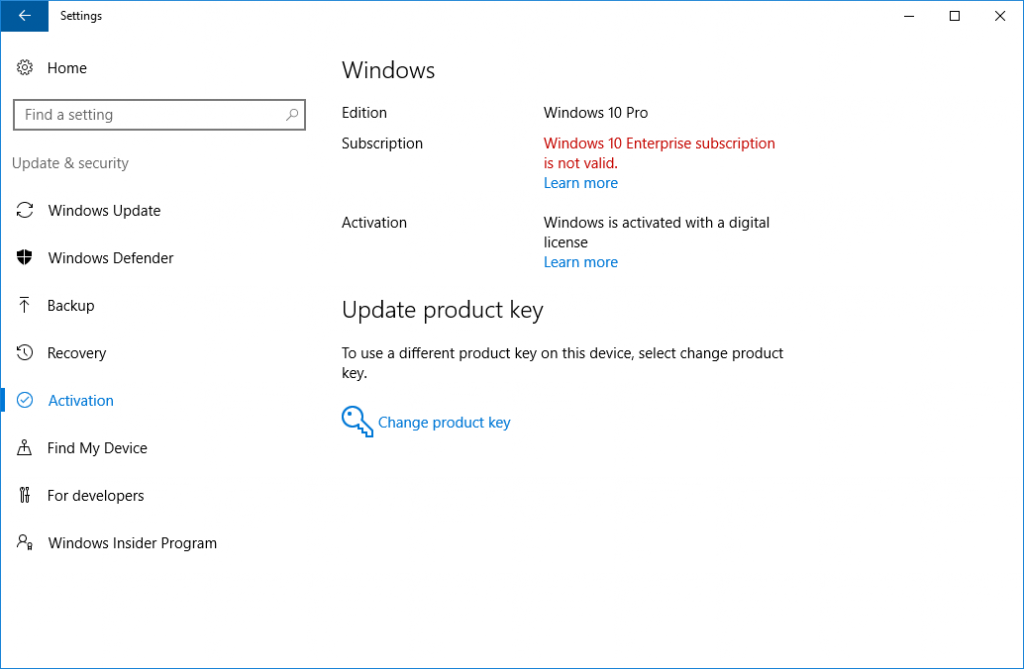
One of my customers purchased a bunch of Microsoft 365 subscriptions in order to use them with Office 365 and Windows 10 Enterprise. The customer called me because he had trouble to activate the Windows 10 Enterprise license.

Source: Microsoft/ microsoft.com

Source: Microsoft/ microsoft.com

I would like so summarize some of the requirements in order to successfuly active Windows 10 Enterprise subscriptions.

License

First of all, there is a licensing requirement. You need at least a Windows 10 Pro or Windows 10 Pro Education. You need one of these licenses! There is no way to use the Windows 10 Enterprise subscription without a base license, because it’s an upgrade!

Horizon View - Why Automated Desktop Pools with Full Clones are still a thing

We have to deal with COVID19 for a year now and from the IT perspective, 2020 was a pretty strange year. Many project were not cancelled, but were placed on-hold. But two kinds of projects went through the roof:

  • Microsoft 365, and
  • Horizon View

As you might noticed I blogged a lot about Exchange, Exchange Online and Horizon this year. The reason for this is pretty simple: That was driving my business this year.

Adobe Flash will die and how does this affects VMware

December 31, 2020 will not only be the end of the miserable year 2020, it will also be the end of an era - the era of Adobe Flash! Adobe has announced that they will stop supporting Adobe Flash after December 31, 2020. Furthermore, Adobe will block Flash from running in Flash Player on January 12, 2021. Adobe strongly recommends that all users immediately uninstall Flash Player. I got a popup a couple of times, asking me if I want to uninstall Adobe Flash. It’s still installed… :/

Exchange HCW8078 - Migration Endpoint could not be created

While migrating a customer from Exchange 2010 to Exchange 2016, I had to create an Exchange Hybrid Deployment, because the customer wants to use Microsoft Teams. Nothing fancy and I’ve did this a couple of times.

Unfortunantely the Hybrid Connection Wizard failed to create the migration endpoint. A quick check of the logs showed this error:

Microsoft.Exchange.MailboxReplicationService.MRSRemotePermanentException: The Mailbox Replication Service could not connect to the remote server because the certificate is invalid. The call to ‘https://mail.contoso.com/EWS/mrsproxy.svc' failed. Error details: Could not establish trust relationship for the SSL/TLS secure channel with authority ‘mail.contoso.com’. –>The underlying connection was closed: Could not establish trust relationship for the SSL/TLS secure channel. –> The remote certificate is invalid according to the validation procedure

Moving a small on-prem environment to Azure/ O365 – Part 2

A couple of days ago, I wrote about our first steps to move our on-prem stuff to Azure. This post will cover how we adopted Office 365 and how we have started with our Azure deployment.

Our first step into Office 365 was Microsoft Teams. We needed a solution for calls (audio/ video) and chat. We skipped Skype 4 Business and started with Microsoft Teams.

Our Microsoft Teams deployment was pretty simple: We used our Microsoft IUR Office 365 E3 plans. Microsoft Azure AD Connect was quickly deployed and the Microsoft Exchange Hybrid Connection Wizard did the rest. Some weeks later we deployed ADFS/ ADFS Proxy. We used this setup over several months and it was pretty slick and was working flawless. At this point, we only used Teams, Planner and OneDrive 4 Business (SharePoint).