
Posts

Horizon View - Why Automated Desktop Pools with Full Clones are still a thing

We have to deal with COVID19 for a year now and from the IT perspective, 2020 was a pretty strange year. Many project were not cancelled, but were placed on-hold. But two kinds of projects went through the roof:

  • Microsoft 365, and
  • Horizon View

As you might noticed I blogged a lot about Exchange, Exchange Online and Horizon this year. The reason for this is pretty simple: That was driving my business this year.
Adobe Flash will die and how does this affects VMware

December 31, 2020 will not only be the end of the miserable year 2020, it will also be the end of an era - the era of Adobe Flash! Adobe has announced that they will stop supporting Adobe Flash after December 31, 2020. Furthermore, Adobe will block Flash from running in Flash Player on January 12, 2021. Adobe strongly recommends that all users immediately uninstall Flash Player. I got a popup a couple of times, asking me if I want to uninstall Adobe Flash. It’s still installed… :/

Exchange HCW8078 - Migration Endpoint could not be created

While migrating a customer from Exchange 2010 to Exchange 2016, I had to create an Exchange Hybrid Deployment, because the customer wants to use Microsoft Teams. Nothing fancy and I’ve did this a couple of times.

Unfortunantely the Hybrid Connection Wizard failed to create the migration endpoint. A quick check of the logs showed this error:

Microsoft.Exchange.MailboxReplicationService.MRSRemotePermanentException: The Mailbox Replication Service could not connect to the remote server because the certificate is invalid. The call to ‘https://mail.contoso.com/EWS/mrsproxy.svc' failed. Error details: Could not establish trust relationship for the SSL/TLS secure channel with authority ‘mail.contoso.com’. –>The underlying connection was closed: Could not establish trust relationship for the SSL/TLS secure channel. –> The remote certificate is invalid according to the validation procedure

Moving a small on-prem environment to Azure/ O365 – Part 2

A couple of days ago, I wrote about our first steps to move our on-prem stuff to Azure. This post will cover how we adopted Office 365 and how we have started with our Azure deployment.

Our first step into Office 365 was Microsoft Teams. We needed a solution for calls (audio/ video) and chat. We skipped Skype 4 Business and started with Microsoft Teams.

Our Microsoft Teams deployment was pretty simple: We used our Microsoft IUR Office 365 E3 plans. Microsoft Azure AD Connect was quickly deployed and the Microsoft Exchange Hybrid Connection Wizard did the rest. Some weeks later we deployed ADFS/ ADFS Proxy. We used this setup over several months and it was pretty slick and was working flawless. At this point, we only used Teams, Planner and OneDrive 4 Business (SharePoint).

VMware ESXi 6.7 memory health warnings after ProLiant SPP

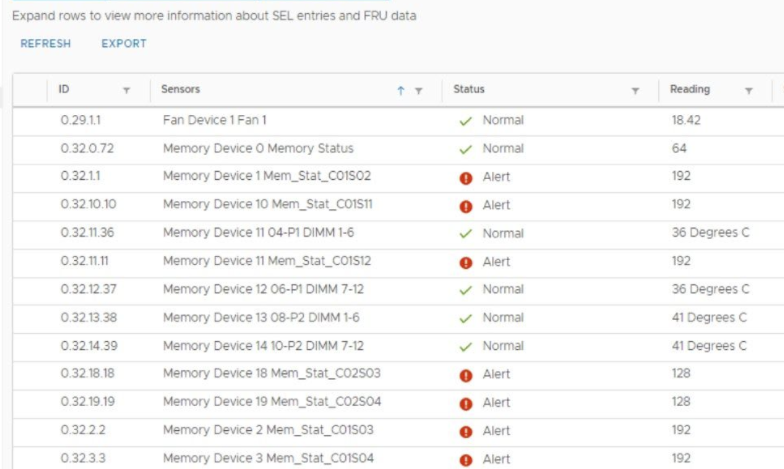
During the deployment of a vSAN cluster consisting of multiple HPE ProLiant DL380 Gen10 hosts, I noticed a memory health warning after updating the firmware using the Support Pack for ProLiant. The error was definitely not shown before the update, so it was clear, that this was not a real issue with the hardware. Furthermore: All hosts showed this error.

Patrick Terlisten/ vcloudnine.de/ Creative Commons CC0

Patrick Terlisten/ vcloudnine.de/ Creative Commons CC0

Exchange Control Panel /ecp broken after certificate replacement

As part of an ongoing Exchange 2010 to 2016 migration, I had to replace the self-signed certificate with a certificate from the customers PKI. Everything went fine, the customer had a suitable template, we’ve added the necessary hostnames and bound IIS and SMTP to the certificate. The mess started with an iisreset /noforce

The iisreset took longer than expected. After that, I tried to login into the ECP, entered username and password and got an error.

Moving a small on-prem environment to Azure/ O365 - Part 1

It was a bit quiet here due to the current COVID 19 pandemic. But now I’m back with a pretty interesting story on how my colleagues and I moved most of our on-prem server stuff to Microsoft Azure and Office 365.

It all started with the COVID19 lockdown in Germany in March 2020. We moved into our home offices after setting up a small VMware Horizon View deployment to access our PCs using physical View Agents and manual desktop pools. Most projects were stopped, and we did most of our work remote. No lay-offs or short-time work.

Setup the View Agent Direct-Connection (VADC) Plug-In

The View Agent Direct-Connection (VADC) Plug-In was designed as an extension to the Horizon Agent, which allows a Horizon Client to directly connect to a VM or physical machine withtout using a Horizon Connection Server.

The VADC is nothing new, it is part of the Horizon View eco system for a couple of years now. Meanwhile, the VADC supports the Blast Exteme protocol, which makes it pretty interesting for remote access to lab environment or home office equipment.

Installation von Horizon View Agent fails continuously with "The System must be rebooted before installation can continue"

This issue was a bit annoying. I faced this issue not in a customer environment, rather then on my second Lenovo laptop, an X250 with Windows 10 20H2. My intention was to use it headless in a docking station. So how should I access it? RDP? TeamViewer? Why not use the Horizon Direct Connection Plug-in?

The Horizon Direct Connection Plug-in is not a new feature and you can think of it as a View Agent without a Connection Server. You can access it using the View Client, but you don’t have to run the connection through a Connection Server. For pretty small environments or direct access a perfect fit!

Update Manager fails with unknown error during host remediation

During an vSphere 6.5 > 6.7 update a was host failing continously at the remediation with an “unknown error”. The host was updated from ESXI 6.5 to 6.7 using an upgrade baseline. Other hosts were updated to 6.7 and with the latest patches without any issues. Something strange was going on…

The esxupdate.log and the vua.log on the host itself showed nothing special. So I checked the vmware-vum-server-log4cpp.log which was much more informative!