
Security

CloudFlare API v4 and Fail2ban: Fixing the unban action

In January 2017, I wrote an article about how to protect your Wordpress blog using the WP Fail2Ban plugin, fail2ban on your Linux/ FreeBSD host, and CloudFlare. Back then, the fail2ban was using the CloudFlare API V1, which was already deprecated since November 2016.

Although the actions were updated later to use CloudFlare API V4, I still had problems with the unbaning of IP addresses. IP addresses were banned, but the unban action failed. 
Windows Network Policy Server (NPS) server won't log failed login attempts

This is just a short, but interesting blog post. When you have to troubleshoot authentication failures in a network that uses Windows Network Policy Server (NPS), the Windows event log is absolutely indispensable. The event log offers everything you need. The success and failure event log entries include all necessary information to get you back on track. If failure events would be logged…

Today, I was playing with Alcatel-Lucent Enterprise OmniSwitches and Access Guardian in my lab. Access Guardian refers to the some OmniSwitch security functions that work together to provide a dynamic, proactive network security solution:

Replace SSL certificates on Citrix NetScaler using the CLI

Sometimes you have to replace SSL certificates instead of updating them, e.g. if you switch from a web server SSL certificate to a wildcard certificate. The latter was my job today. In my case, the SSL certificate was used in a Microsoft Exchange 2016 deployment, and the NetScaler configuration was using multiple virtual servers. I’m using this little script for my NetScaler/ Exchange deployments.

When using multiple virtual servers, replacing a SSL certificate using the GUI can be challenging, because you have to navigate multiple sites, click here, click there etc. Using the CLI, the same task is much easier und faster. I like the Lean mindset, so I’m trying to avoid “waste”, in this case, “waste of time”.

Bypass stateful firewall on a Sophos XG

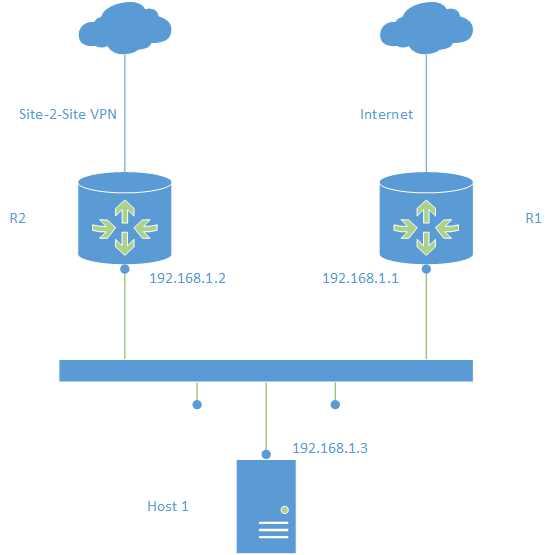
Usually, bypassing a firewall is not the best idea. But sometimes you have to. One case, where you want to bypass a firewall, is asymmetric routing.

What is asymmetric routing? Imagine a scenario with two routers on the same network. One router offeres access to the internet, the other router provides access to other sites with site-2-site VPN tunnels.

Patrick Terlisten/ vcloudnine.de/ Creative Commons CC0

Patrick Terlisten/ vcloudnine.de/ Creative Commons CC0

DOT1X authentication failed on HPE OfficeConnect 1920 switches

The last two days, I have supported a customer during the implementation of 802.1x. His network consisted of HPE/ Aruba and some HPE Comware switches. Two RADIUS server with appropriate policies was already in place. The configuration and test with the ProVision based switches was pretty simple. The Comware based switches, in this case OfficeConnect 1920, made me more headache.

The customer had already mac authentication running, so all I had to do, was to enable 802.1x on the desired ports of the OfficeConnect 1920. The laptop, which I used to test the connection, was already configured and worked flawless if I plugged it into a 802.1x enabled port on a ProVision based switch. The OfficeConnect 1920 simply wrote a failure to its log and the authentication failed. The RADIUS server does not logged any failure, so I was quite sure, that the switch caused the problem.

Security: If it doesn't hurt, you're doing it wrong!

The Informationsverbund Berlin-Bonn (IVBB), the secure network of the german government , was breached by an unknown hacker group. Okay, a secure government network might be a worthy target for an attack, but your network not, right? Do you use the same password for multiple accounts? There were multiple massive data breaches in the past. Have you ever checked if your data were also compromised? I can recommend haveibeenpwned.com. If you want to have some fun, scan GitHub for -—-BEGIN RSA PRIVATE KEY—–. Do you use a full disk encryption on your laptop or PC? Do you sign and/ or encrypt emails using S/MIME or PGP? Do you use different passwords for different services? Do you use 2FA/ MFA to secury importan services? Do you never work with admin privileges when doing normal office tasks? No? Why? Because it’s uncomfortable to do it right, isn’t it?

NetScaler native OTP does not work for users with many group memberships

Some days ago, I have implemented one-time passwords (OTP) for NetScaler Gateway for one of my customers. This feature was added with NetScaler 12, and it’s a great way to secure NetScaler Gateway with a native NetScaler feature. Native OTP does not need any third party servers. But you need a NetScaler Enterprise license, because nFactor Authentication is a requirement.

To setup NetScaler native OTP, I followed the availbe guides on the internet.

Meltdown & Spectre: What about Microsoft Exchange?

On January 18, 2018, Microsoft has published KB4074871 which has the title “Exchange Server guidance to protect against speculative execution side-channel vulnerabilities”. As you might guess, Exchange is affected by Meltdown & Spectre - like any other software. Microsoft explains in KB4074871:

Because these are hardware-level attacks that target x64-based and x86-based processor systems, all supported versions of Microsoft Exchange Server are affected by this issue.

Like Citrix, Microsoft does not offer any updates to address this issue, because there is nothing to fix in Microsoft Exchange. Instead of this, Microsoft recommends to run the lates Exchange Server cumulative update and any required security updates. On top, Microsoft recommends to check software before it is deployed into production. If Exchange is running in a VM, Microsoft recommends to follow the instructions offered by the cloud or hypervisor vendor.

Meltdown & Spectre: What about HPE Storage and Citrix NetScaler?

In addition to my shortcut blog post about Meltdown and Spectre with regard of Microsoft Windows, VMware ESXi and vCenter, and HPE ProLiant, I would like to add some additional information about HPE Storage and Citrix NetScaler.

When we talk about Meltdown and Spectre, we are talking about three different vulnerabilities:

  • CVE-2017-5715 (branch target injection)
  • CVE-2017-5753 (bounds check bypass)
  • CVE-2017-5754 (rogue data cache load)

CVE-2017-5715 and CVE-2017-5753 are known as “Spectre”, CVE-2017-5754 is known as “Meltdown”. If you want to read more about these vulnerabilities, please visit meltdownattack.com.

The Meltdown/ Spectre shortcut blogpost for Windows, VMware and HPE

Change History

01-13-2018: Added information regarding VMSA-2018-0004 01-13-2018: HPE has pulled Gen8 and Gen9 system ROMs 01-13-2018: VMware has updated KB52345 due to issues with Intel microcode updates 01-18-2018: Updated VMware section 01-24-2018: Updated HPE section 01-28-2018: Updated Windows Client and Server section 02-08-2018: Updated VMware and HPE section 02-20-2018: Updated HPE section 04-17-2018: Updated HPE section


Many blog posts have been written about the two biggest security vulnerabilities discovered so far. In fact, we are talking about three different vulnerabilities: