Storage

First experience: Nexsan E-Series

One of my longtime DataCore customers has started a project to replace their current DataCore storage servers and backend storage with new hardware. In opposite of the current setup, the newly installed backend storage is now FC-attached. The customer has selected Nexsan E-Series E32V, E32XV and E48V storage systems in combination with DataCore SANsymphony-V10.

Who is Nexsan?

The question should be: Who is Imation? Nexsan was founded in 1999 in Derby, England, but was aquired by Imation in December 2012. Since December 2012, Nexsan is one of Imations brands and offers, as a storage-only company, three different product lines: Assureon Secure StorageE-Series High Density Storage and NST Hybrid Storage.

Chicken-and-egg problem: 3PAR VSP 4.3 MU1 & 3PAR OS 3.2.1 MU3

Since monday I’m helping a customer to put two HP 3PAR StoreServ 7200c into operation. Both StoreServs came factory-installed with 3PAR OS 3.2.1 MU3, which is available since July 2015. Usually, the first thing you do is to deploy the 3PAR Service Processor (SP). These days this is (in most cases) a Virtual Service Processor (VSP). The SP is used to initialize the storage system. Later, the SP reports to HP and it’s used for maintenance tasks like shutdown the StoreServ, install updates and patches. There are only a few cases in which you start the Out-of-the-Box (OOTB) procedure of the StoreServ without having a VSP. I deployed two (one VSP for each StoreServ) VSPs, started the Service Processor Setup Wizard, entered the StoreServ serial number and got this message:

DataCore mirrored virtual disks full recovery fails repeatedly

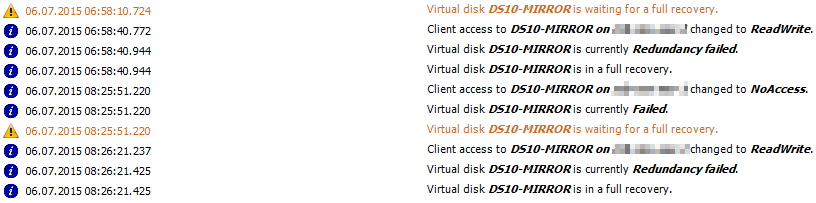
Last sunday a customer suffered a power outage for a few hours. Unfortunately the DataCore Storage Server in the affected datacenter weren’t shutdown and therefore it crashed. After the power was back, the Storage Server was started and the recoveries for the mirrored virtual disks started. Hours later, three mirrored virtual disks were still running full recoveries and the recovery for each of them failed repeatedly.

Patrick Terlisten/ vcloudnine.de/ Creative Commons CC0

Patrick Terlisten/ vcloudnine.de/ Creative Commons CC0

FVP Freedom: Get Pernix'd for free

PernixData is one of the presenting sponsors at the Virtualization Field Day 5 (VFD5). One of the four key announcements is FVP Freedom.

FVP Freedom will be available in the Fall of 2015 and it’s a completely free version of PernixData FVP. Of course, the functionality is limited. FVP Freedom will only support a single cluster, but with an unlimited number of VMs. Instead of SSDs, FVP Freedom will support up to 128 GB of DFTM (Distributed Fault Tolerant Memory) per cluster. FVP Freedomm will be completely community supported.

HP offers 1TB StoreOnce VSA for free

A free StoreOnce VSA, like the well known 1 TB StoreVirtual VSA? That would be too cool to be real. But it is real! Since February, HP offers a free 1 TB version of their StoreOnce VSA. I totally missed this announcement, but thanks to Calvin Zito I noticed it today:

The link leads to another blog post from Ashwin Shetty (Can you protect your data for free? Introducing the new free 1TB StoreOnce VSA), in which he provides more information about the free 1 TB StoreOnce VSA.

Tiering? Caching? Why it's important to differ between them.

Some days ago I talked to a colleague from our sales team and we discussed different solutions for a customer. I will spare you the details, but we discussed different solutions and we came across PernixData FVP, HP 3PAR Adaptive OptimizationHP 3PAR Adaptive Flash Cache and DataCore SANsymphony-V. And then the question of all questions came up: “What is the difference?”.

Simplify, then add Lightness

Lets talk about tiering. To make it simple: Tiering moves a block from one tier to another, depending on how often a block is accessed in a specific time. A tier is a class of storage with specific characteristics, for example ultra-fast flash, enterprise-grade SAS drives or even nearline drives. Characteristics can be the drive type, the used RAID level or a combination of characteristics. A 3-tier storage design can consist of only one drive type, but they can be organized in different RAID levels. Tier 1 can be RAID 1 and tier 3 can be RAID 6, but all tiers use enterprise-grade 15k SAS drives. But you can also mix drive types and RAID levels, for example tier 1 with flash, tier 2 with 15k SAS in a RAID 5 and tier 3 with SAS-NL and RAID 6. Each time a block is accessed, the block “heats up”. If it’s hot enough, it is moved one tier up. If it’s less often accessed, the block “cools down” and at a specific point, the block is moved a tier down. If a tier is full, colder blocks will to be moved down and hotter block have to be moved up. It’s a bit simplified, but products like DataCore SANsymphony-V with Auto-Tiering or HP 3PAR Adaptive Optimization are working this way.

What to consider when implementing HP 3PAR with iSCSI in VMware environments

Some days ago a colleague and I implemented a small 3-node VMware vSphere Essentials Plus cluster with a HP 3PAR StoreServ 7200c. Costs are always a sore point in SMB environments, so it should not surprise that we used iSCSI in this design. I had some doubt about using iSCSI with a HP 3PAR StoreServ, mostly because of the performance and complexity. IMHO iSCSI is more complex to implement then Fibre Channel (FC). But in this case I had to deal with it.

Update OS or reinstall DataCore SANsymphony-V Storage Server

Sometimes you have to update the OS of your DataCore Storage Server, or the server is crashed and you have to reinstall it. In both cases, a configuration backup is the starting point. The procedure remains the same, regardless if it’s an update or a reinstall after a server crash:

  • Install Windows Server OS
  • Copy configuration backup file to C:\Program Files\DataCore\SANsymphony\Recovery
  • Install DataCore SANsymphony-V

Take a backup

You can take the configuration backup on different ways:

My first impressions about PernixData FVP 2.5

On February 25, 2015 PernixData released the latest version of PernixData FVP. Even if it’s only a .5 release, FVP 2.5 adds some really cool features and improvements. New features are:

  • Distributed Fault Tolerant Memory-Z (DFTM-Z)
  • Intelligent I/O profiling
  • Role-based access control (RBAC), and
  • Network acceleration for NFS datastores

Distributed Fault Tolerant Memory-Z (DFTM-Z)

FVP 2.0 introduced support for server side memory as an acceleration resources. With this it was possible to use server side memroy to accelerate VM I/O operations. Server side memory is faster then flash, but also more expensive. With FVP 2.5, the support for adaptive memory compression. was added. DFTM-Z provides a more efficient use of the expensive resource “server side memory”.  Some of you may think “Oh no, compression! This will only cost performance!”. I don’t think that this is fair. ;) The PernixData engineers are focused on performance and I think that they haven’t during the development of DFTM-Z. DFTM-Z is enabled on hosts that use at least 20 GB memory for FVP. With increasing memory used for FVP, the area used for compression in the memory is also increased. So not the whole memory area used for acceleration is compressed, it’s only a part of it. With 20 GB contributing the FVP cluster, the compressed memory region is 4 GB. With more than 160 GB, the region is increased to 32 GB.