
Vmware

VM shows alarm - but no alarm triggered

Today I observed a strange behaviour of several VMs at a customer. Several VMs in a cluster showed an alarm, but neither on the alarm tab of the VM, nor the alarm section at the bottom of the C# client showed an error.
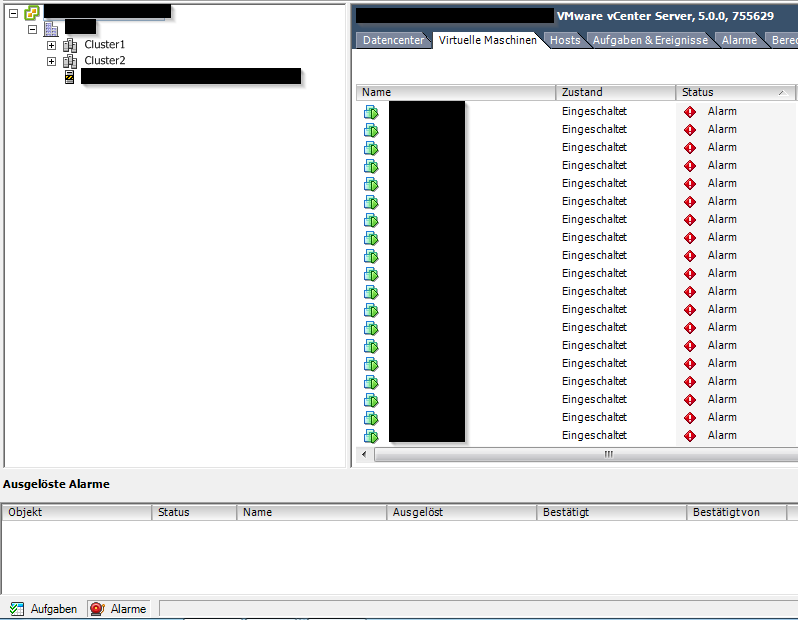
Patrick Terlisten/ vcloudnine.de/ Creative Commons CC0

Patrick Terlisten/ vcloudnine.de/ Creative Commons CC0

The customer still uses vSphere 5.0. An upgrade to 5.5 is on the roadmap. The symptoms:

Conflicting information: Setting iops option for VMW_PSP_RR for HP 3PAR StoreServ on ESXi

Yesterday I received the following tweet:

Later Craig Kilborn joined the conversation and I decided to clarify this 100 or 1 IOPS myth the next morning.

In order to give you some context: I wrote a blog post about adding a custom SATP claimrule for HP 3PAR StoreServ storage on ESXi. In this blog post I pointed out, that the claim rule is usually used to change the default behaviour for switching the path for active IO. For the VMW_PSP_RR this is 1000 IOPS, which means, that after 1000 IOPS for a specific device, the path for the active IO to this device ist changed to the next active and optimized IO path. I recommend to read this blog post from Duncan Epping for more information.

Add custom SATP claimrule for HP 3PAR to VMware ESXi

One of the tasks that I finish before I present the first Virtual Volumes (VV) to hosts is to discuss the need of a custom SATP claimrule with the customer. Requirement for a custom claimrule is usually, that the active and optimized path should be switched after each IO and not after 1000 IOs. Duncan Epping wrote a nice blog post some years ago. I recommend to read it.

Some basics

The Storage Array Type Plug-In (SATP) is responsable for array-specific operations, like health monitoring of physical paths, reporting of path state changes and path failover. Each SATP is linked to a Path Selection Policy (PSP), which controls the selection of active paths for IO. VMware ESXi provides a couple of SATPs:

Protection of virtual machines with HP StoreOnce VSA & Veeam Backup & Replication v7

HP StoreOnce Appliances or VSA offers three different types of backup destinations:

  • Virtual Tape Library (VTL)
  • NAS (CIFS or NFS)
  • StoreOnce Catalyst

If you use Veeam Backup & Replication, the NAS feature is possibly worth a try. Using the NAS feature, the StoreOnce appliance or VSA offers a CIFS or NFS share, which can be used as a backup destionation. Today I want to show you how you can use a NAS share of a StoreOnce VSA with Veeam Backup & Replication.To backup virtual maschines with Veeam Backup & Replication to a HP StoreOnce VSA you need at least three things:

Deploying HP StoreOnce VSA with HP Data Protector - Part I

The HP StoreOnce VSA is a virtual storage appliance, that is designed for backups between 1 TB and 10 TB and it’s based on HPs StoreOnce technology. I wrote a short overview about the HP StoreOnce VSA some weeks ago. Take a look at this blog posting if you are not familiar with HP StoreOnce VSA. This article is focuses on the deployment of the HP StoreOnce VSA in a VMware vSphere environment. A second and third blog post covers the configuration of the HP StoreOnce VSA with HP Data Protector.

Deploying HP StoreVirtual VSA - Part I

I would like to thank Calvin Zito for the donation of StoreVirtual NFR licenses to vExperts. This will help to spread the knowhow about this awesome product! If you are not a vExpert, you can download the StoreVirtual VSA for free and try it for 60 days. If you are a vExpert, ping Calvin on Twitter for a 1y NFR license.

This blog post covers the deployment of the current StoreVirtual VSA release (LeftHand OS 11). A second blog post covers the configuration using the CMC. Both posts are focused on LeftHand OS 11 and VMware vSphere. If you are searching for a deployment and configuration guide for LeftHand OS 9.x or 10 on VMware vSphere, take a look at this two blog posts from Craig Kilborn: Part 1 – How To Install & Configure HP StoreVirtual VSA On vSphere 5.1 & Part 2 – How To Install & Configure HP StoreVirtual VSA On vSphere 5.1. Another blog post that covers LeftHand OS 11 is from Hugo Strydom. Hugo wrote about what he did with his VSA (vExpert : What I did with my HP VSA). I wrote a blog post about the HP StoreVirtual VSA some weeks ago. If you are interested in some basics about the VSA, check my mentioned blog post.

Deploying HP StoreVirtual VSA – Part II

Part I of this series covered the deployment, part II is dedicated to the configuration of the StoreVirtual VSA cluster. I assume that the Centralized Management Console (CMC) was installed. Start the CMC. If you see no systems unter “Available Systems”, client “Find” on the menu and then choose “Find Systems…”. A dialog will appear. Click “Add…” and enter the ip address of one of the earlier deployed VSA nodes. Repeat this until all deployed VSA nodes are added. Then click “Close”. Now you should have all available VSA nodes listed under “Available Systems”.

VMware ESXi 5.5 host doesn't mount VMFS 5 datastore

Yesterday I stumbled over a forum post in a german VMware forum. A user noticed after a vSphere 5.5 update, that a newly updated ESXi 5.5 hosts wasn’t able to mount some datastores. The host was updated with a HP customized ESXi 5.5 Image. The other two hosts, ESXi 5.1 installed from a HP customized image, had no problems. A HP P2000 G3 MSA Array with iSCSI was used as shared storage. The datastores with VMFS version 5.54 were mounted. Only datastores with VMFS 5.58 were not mouted. The user evacuated the VMs off one of the datastores, and then deleted and recreated the datastore. The recreated datastore appeared for a short moment and than disappered again.

IaaS by VMware: VMware vCloud Hybrid Service

VMware vCloud Hybrid Service (vCHS) stands in one line with Amazon Web Services, Microsoft Azure, Rackspace Cloud or other cloud offerings. I don’t want to compare the different provider with vCHS. To be honest: This article is more a summary for myself, than really new content. I just want to summarize information about the IaaS offering of VMware. If you want a comparison of vCHS and AWS, I recommend to read this article written by Alex Mattson (AHEAD).

Trouble with Broadcom NetXtreme II and VMware ESXi

I faced today a really nasty problem. I have four HP ProLiant DL360 G6 in my lab. This server type has two 1 GbE NICs with the Broadcom NetXtreme II BCM5709 chip onboard, which are usually claimed by the bnx2 driver. While applying a host profile to three of the hosts, one hosts reported an error. Supposedly the host hasn’t a vmnic0 and because of this the host profile couldn’t be applied. Okay, quick check in the vSphere Web Client: Only three NICs. C# client showed the same result. Now it was interesting: