
Vmware

Two registry changes to improve physical Horizon View Agent experience

Using physical clients as Horizon View agents is pretty common for me. My office pc, as well as my Lenovo X250 are often used by using the Horizon View Client and the Blast protocol. But as good as the performance is, there were a couple of things that bugged me.

On my office pc, I encountered pretty often a black screen, either on first connect, or on reconnect. The typical issue caused by misconfigured firewall policies, but this was completly out of scope in this case, because my collegues never had issues with black screens. The problem occured with different versions of View Agent.
vCenter Server migration to 6.7 fails with "Failed to check VMware STS. The SSL certificate of STS service cannot be verified"

There are still customers out there that are running vCenter Server on a Windows host. This year, despite the fact that most customers have set project on hold, I managed some of them to migrate to a vCenter Server Appliance.

Some days ago I had an meeting with one of my favorite customers to migrate their vCenter Server 6.5 to a vCenter Server Appliance 6.7 U3l. They were still on 6.5 because of some legacy ESXi 5.5 hosts, but they managed it to remove them from their vCenter and we were able to start the migration.

Horizon View - Why Automated Desktop Pools with Full Clones are still a thing

We have to deal with COVID19 for a year now and from the IT perspective, 2020 was a pretty strange year. Many project were not cancelled, but were placed on-hold. But two kinds of projects went through the roof:

  • Microsoft 365, and
  • Horizon View

As you might noticed I blogged a lot about Exchange, Exchange Online and Horizon this year. The reason for this is pretty simple: That was driving my business this year.

Adobe Flash will die and how does this affects VMware

December 31, 2020 will not only be the end of the miserable year 2020, it will also be the end of an era - the era of Adobe Flash! Adobe has announced that they will stop supporting Adobe Flash after December 31, 2020. Furthermore, Adobe will block Flash from running in Flash Player on January 12, 2021. Adobe strongly recommends that all users immediately uninstall Flash Player. I got a popup a couple of times, asking me if I want to uninstall Adobe Flash. It’s still installed… :/

VMware ESXi 6.7 memory health warnings after ProLiant SPP

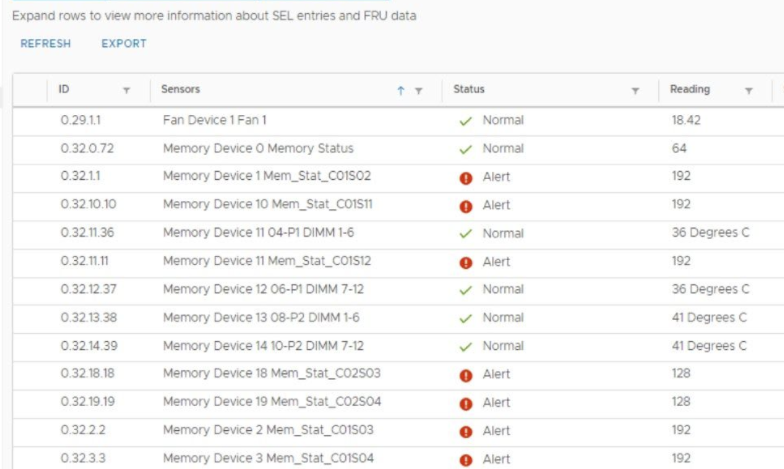
During the deployment of a vSAN cluster consisting of multiple HPE ProLiant DL380 Gen10 hosts, I noticed a memory health warning after updating the firmware using the Support Pack for ProLiant. The error was definitely not shown before the update, so it was clear, that this was not a real issue with the hardware. Furthermore: All hosts showed this error.

Patrick Terlisten/ vcloudnine.de/ Creative Commons CC0

Patrick Terlisten/ vcloudnine.de/ Creative Commons CC0

Setup the View Agent Direct-Connection (VADC) Plug-In

The View Agent Direct-Connection (VADC) Plug-In was designed as an extension to the Horizon Agent, which allows a Horizon Client to directly connect to a VM or physical machine withtout using a Horizon Connection Server.

The VADC is nothing new, it is part of the Horizon View eco system for a couple of years now. Meanwhile, the VADC supports the Blast Exteme protocol, which makes it pretty interesting for remote access to lab environment or home office equipment.

Installation von Horizon View Agent fails continuously with "The System must be rebooted before installation can continue"

This issue was a bit annoying. I faced this issue not in a customer environment, rather then on my second Lenovo laptop, an X250 with Windows 10 20H2. My intention was to use it headless in a docking station. So how should I access it? RDP? TeamViewer? Why not use the Horizon Direct Connection Plug-in?

The Horizon Direct Connection Plug-in is not a new feature and you can think of it as a View Agent without a Connection Server. You can access it using the View Client, but you don’t have to run the connection through a Connection Server. For pretty small environments or direct access a perfect fit!

Update Manager fails with unknown error during host remediation

During an vSphere 6.5 > 6.7 update a was host failing continously at the remediation with an “unknown error”. The host was updated from ESXI 6.5 to 6.7 using an upgrade baseline. Other hosts were updated to 6.7 and with the latest patches without any issues. Something strange was going on…

The esxupdate.log and the vua.log on the host itself showed nothing special. So I checked the vmware-vum-server-log4cpp.log which was much more informative!

Fan health sensors report false alarms on HPE Gen10 Servers with ESXi 6.7

I’ve got several mails and comments about this topic. It looks like that the latest ESXi 6.7 updates are causing some trouble on HPE ProLiant Gen10 servers.

I’ve blogged about recurring host hardware sensor state alarm messages some weeks ago. A customer noticed them after an update. Last week, I got the first comments under this blog post abot fan failure messages after applying the latest ESXi 6.7 updates. Then more and more customers asked me about this, because they got these messages too in their environment after applying the latest updates.

Space reclamation of VMFS 5 Datastores using esxcli

It was a bit quiet here in January caused by a new “private project” which has attracted some resources, and will pull more resources in the future.

But this will not stop me from documenting useful stuff. This one is nothing new, but commonly asked by some customers: How do I get my storage capacity back after deleting VMs?!

The outlined steps are all done using esxcli. You need to execute them on a single ESXi host, not on each host in the cluster.