
Hpe

Using HP StoreOnce as target for Windows Server Backup (WSB)

Some days ago, I blogged about the new HP StoreOnce software release 3.13.0. This release included several fixes. One fix wasn’t mentioned by me, although it’s interesting.

  • Fixed issue where Windows 2012 R2 built-in native backup was not supported with 3.12.x software (BZ 61232)

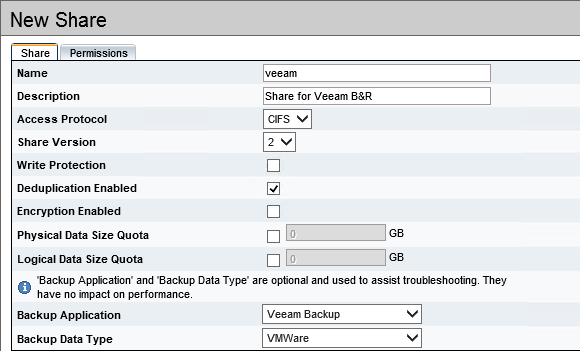
Windows Server Backup (WSB) is part of Windows Server since Windows Server 2008. WSB can create bare metal backups and recover those backups. The same applies to system state backups, file level backups, Hyper-V VMs, Exchange etc. Very handy for small environmens. Backup can be stored on disk or on a file share. With Server 2012, the file share must be SMB3 capable. So if it’s not a Windows file server, the NAS that offers the file share has to be SMB3 capable. This doesn’t apply to Windows Server 2008 (R2).
HP Comware and Windows NLB cluster in multicast mode

In January 2014 I wrote a blog post about network flooding because of Windows NLB clusters in unicast mode. Yesterday, Windows NLB, HP switches and I met again.

After moving a customers core network from HP 5400zl switches to two IRF stacks with HP 7506 switches, multiple Windows NLB clusters stopped working. Because the Windows NLB used multicast operation mode, it was instantly clear that the switches were the problem.

The explanation is easy: By default, a Comware based switch does not learn multicast MAC addresses. And because of this, the switch does not add them to the ARP table. And you can’t add static multicast MAC address entries. You have to disable the ARP entry check.

HP StoreOnce Backup System software version 3.13.0 is available

Since september 2015, the latest version of HP StoreOnce backup system software is available. The latest release 3.13.0 is available for HP StoreOnce VSA, 6500, B6200 multi-node and all single node systems running software version 3.x. This also applies to some D2D 2500, 4100 and 4300 single-node backup systems running software versions 2.x. Make sure that you take a look into customer notice c03729283 for details on performing the conversion.

This release comes with some nice enhancements, e.g.

HP Comware: Forwarding subnet-directed broadcasts for Wake-on-LAN

Last week, my colleague Claudia and I have ported a HP ProVision configuration to HP Comware. Unexpectedly, it wasn’t routing or VLANs or OSPF that caused headaches, it was a Wake-on-LAN (WoL). Depending on the used tool, the magic packet (which wakes up the computer) is a broadcast (255.255.255.255) or a subnet-directed broadcast (e.g. 192.168.200.255). So it was important to know what tool the customer used.

This is how HP ProVision implements subnet-directed broadcasts:

Chicken-and-egg problem: 3PAR VSP 4.3 MU1 & 3PAR OS 3.2.1 MU3

Since monday I’m helping a customer to put two HP 3PAR StoreServ 7200c into operation. Both StoreServs came factory-installed with 3PAR OS 3.2.1 MU3, which is available since July 2015. Usually, the first thing you do is to deploy the 3PAR Service Processor (SP). These days this is (in most cases) a Virtual Service Processor (VSP). The SP is used to initialize the storage system. Later, the SP reports to HP and it’s used for maintenance tasks like shutdown the StoreServ, install updates and patches. There are only a few cases in which you start the Out-of-the-Box (OOTB) procedure of the StoreServ without having a VSP. I deployed two (one VSP for each StoreServ) VSPs, started the Service Processor Setup Wizard, entered the StoreServ serial number and got this message:

HP Service Pack for ProLiant 2015.04

Some weeks ago, HP has published an updated version of their HP Service Pack for ProLiant (SPP). The SPP 2015.04.0 has added support for

  • new HP ProLiant servers and options,
  • support for Red Had Enterprise Linux 6.6, SUSE Linux Enterprise Server 12, VMware vSphere 5.5 U2 and (of course) VMware vSphere 6.0,
  • HP Smart Update Manager v7.2.0 was added,
  • the HP USB Key Utility for Windows v2.0.0.0 can now handle downloads greater than 4GB (important, because this release may not fit on a standard DVD media…)
  • select Linux firmware components is now available in rpm format

In addition, the SPP covers two important customer advisories:

Safe (or safer) than backup to tape: HP StoreOnce

When talking to SMB customers, most of them don’t want to talk about their backup strategy. It’s paradox: They know that data loss can ruin their business, but they don’t want to invest money into a fully tested recovery concept (I try to avoid the word “backup concept” - Recovery is the key). Because of tight budgets and lacking knowledge, many customers use traditional concepts in a virtualized world. This often ends  in traditional backup applications with agents deployed into guest OS, and backups that are written to tape (or worse: On USB disks). If you ask a customer “Why do you store your data on tape?”, only a few argue with costs per GB or performance. Most the customer argue with something like

HP offers 1TB StoreOnce VSA for free

A free StoreOnce VSA, like the well known 1 TB StoreVirtual VSA? That would be too cool to be real. But it is real! Since February, HP offers a free 1 TB version of their StoreOnce VSA. I totally missed this announcement, but thanks to Calvin Zito I noticed it today:

The link leads to another blog post from Ashwin Shetty (Can you protect your data for free? Introducing the new free 1TB StoreOnce VSA), in which he provides more information about the free 1 TB StoreOnce VSA.

What to consider when implementing HP 3PAR with iSCSI in VMware environments

Some days ago a colleague and I implemented a small 3-node VMware vSphere Essentials Plus cluster with a HP 3PAR StoreServ 7200c. Costs are always a sore point in SMB environments, so it should not surprise that we used iSCSI in this design. I had some doubt about using iSCSI with a HP 3PAR StoreServ, mostly because of the performance and complexity. IMHO iSCSI is more complex to implement then Fibre Channel (FC). But in this case I had to deal with it.