Posts

Checking the 3PAR Quorum Witness appliance

Two 3PAR StoreServs running in a Peer Persistence setup lost the connection to the Quorum Witness appliance. The appliance is an important part of a 3PAR Peer Persistence setup, because it acts as a tie-breaker in a split-brain scenario.

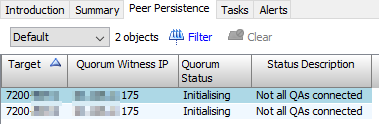
While analyzing this issue, I saw this message in the 3PAR Management Console:

Patrick Terlisten/ vcloudnine.de/ Creative Commons CC0

Patrick Terlisten/ vcloudnine.de/ Creative Commons CC0

In addition to that, the customer got e-mails that the 3PAR StoreServ arrays lost the connection to the Quorum Witness appliance. In my case, the CouchDB process died. A restart of the appliance brought it back online.

Single Sign On (SSO) with RemoteApps on Windows Server 2012 (R2)

A RemoteApp is an application, that is running on a Remote Desktop Session Host (RDSH), and only the display output is sent to the client. Because the application is running on a RDSH, you can easily deliver applications to end users. Another benefit is, that data is not leaving the datacenter. Software and data are kept inside the datacenter. RemoteApps can be used and deployed in various ways:

  • Users can start RemoteApps through the Remote Desktop Web Access
  • Users can start RemoteApps using a special RDP file
  • Users can simply start a link on the desktop or from the start menu (RemoteApps and Desktop connections deployed by an MSI or a GPO)
  • or they can click on a file that is associated with a RemoteApp

Even in times of VDI (LOL…), RemoteApps can be quite handy. You can deploy virtual desktops without any installed applications. Application can then delivered using RemoteAPps. This can be handy, if you migrate from RDSH/ Citrix published desktops to  VMware Horizon View. Or if you are already using RDSH, and you want to try VMware Horizon View.

Horizon View: Server certificate does not match the external url

Patrick Terlisten/ vcloudnine.de/ Creative Commons CC0

Patrick Terlisten/ vcloudnine.de/ Creative Commons CC0

Certificates are always fun… or should I say PITA?  Whatever… During a small Horizon View PoC, I noticed an error message for the View Connection Server.

That’s right, Mr. Connection Server. The certificate subject name does not match the servers external URL, as this screenshot clearly shows.

Patrick Terlisten/ vcloudnine.de/ Creative Commons CC0

Patrick Terlisten/ vcloudnine.de/ Creative Commons CC0

Tiny PowerShell/ Azure project: Deploy-AzureLab.ps1

One of my personal predictions for 2017 is, that Microsoft Azure will gain more market share. Especially here in Germany. Because of this, I have started to refresh my knowledge about Azure. A nice side effect is that I can also improve my PowerShell skills.

Currently, the script creates a couple of VMs and resource groups. Nothing more, nothing less. The next features I want to add are:

  • add additional disks to the DCs (for SYSVOL and NTDS)
  • promote both two servers to domain controllers
  • change the DNS settings for the Azure vNetwork
  • deploy a Windows 10 client VM

I created a new repository on GitHub and shared a first v0.1 as public Gist. Please note, that this is REALLY a v0.1.

Using WP fail2ban with the CloudFlare API to protect your website

The downside of using WordPress is that many people use it. That makes WordPress a perfect target for attacks. I have some trouble with attacks, and one of the consequences is, that my web server crashes under load. The easiest way to solve this issue would be to ban those IP addresses. I use Fail2ban to protect some other services. So the idea of using Fail2ban to ban IP addresses, that are used for attacks, was obvious.

The Linux OOM killer strikes again

As a frequent reader of my blog, you might have noticed that vcloudnine.de was unavailable from time to time. Reason for this was, that my server was running out of memory at night.

Jan  1 05:22:16 webserver kernel: : httpd invoked oom-killer: gfp_mask=0x200da, order=0, oom_adj=0, oom_score_adj=0

Running out of memory is bad for system uptime. Sometimes you have to sacrifice someone to help others.

It is the job of the linux ‘oom killer’ to sacrifice one or more processes in order to free up memory for the system when all else fails.

2016 - How did it go?

The year 2016 is coming to an end (thank god…). 2016 was a difficult year. One of my goals for 2016 was to write more PowerShell code and to learn Python. I missed both goals. But hey, at least I cleaned up my Git account.I renewed my VCP by passing VCP6 in the first attempt, and I took the VCP7-DTM beta exam (no results yet). Since I am not the guy who attends conferences, I was not attending VMworld in Barcelona or HPE Discover in London. In fact: I was no at no conference or vendor roadshow, because I had an ass full of work.

Surprise, surprise: Enable/ disable circular logging without downtime

As part of a troubleshooting process, I had to disable circular logging on a Microsoft Exchange 2013 mailbox database, that was part of a Database Availability Group (DAG).

What is circular logging? Microsoft Exchange uses log files that record all transactions and modifications to a mailbox database. In this case, Exchange works like MS SQL or Oracle. These log files are used, to bring the database back to a consistent state after a crash, or to recover a database to a specific point-in-time. Because everything is written to log files, the number of log files increases over time. Log files are truncated, as soon as a successful full backup of the database is taken.

VMware EUC Access Point appliance - Name resolution not working after deployment

As part of a project, I had to deploy a VMware EUC Access Point appliance. Nothing fancy, because the awesome VMware Access Point Deployment Utility makes it easy to deploy.

Unfortunately, the deployed Access Point appliance was not working as expected. When I tried to access my Horizon View infrastructure behind the Access Point appliance, I got a HTTP 504 error. The REST API interface was working. I was able to exclude invalid certificates, routing, or firewall policies. I re-deployed the appliance using the the IP address of the connection server, instead of the FQDN. And this worked… I checked the name resolution with nslookup and the name resolution failed. So that was probably the problem.

Important foot note: Windows 10 Enterprise LTSB 2016 requires a new KMS host key

Today, I have stumbled upon a fact that is worth being documented.

TL;DR: Use the “Windows Srv 2016 DataCtr/Std KMS” host key (CSVLK), if you want to activate Windows 10 Enterprise LTSB 2016 using KMS. Or use AD-based activation. For more information read the blog post of the Ask the Core Team: Windows Server 2016 Volume Activation Tips.

A customer wants to deploy Windows 10 Enterprise LTSB 2016. A Windows Server 2012 R2 is acting as KMS host, and successfully activates Windows Server 2012 R2 and Microsoft Office 2013 Professional Plus. The “Windows Srv 2012R2 DataCtr/Std KMS for Windows 10” CSVLK was successfully installed. Nevertheless, the “current count” value does not increase. The client logged the event 12288: