Posts

HP VSR1000: How to configure a IPsec tunnel

One possible use case for the HP VSR1000 is to build IPsec tunnels for secure data transfer. In this post I will show you how to configure a IPsec tunnel between two HP VSR1000. If you need a short introduction, feel free to take a look at this article.

The experimental setup

We have two server VMs (in this case Windows Server 2008 R2 with SP1) and two HP VSR1000 Virtual Service Router. To simplify I added a vSwitch without uplinks to my ESXi at home. This vSwitch has three port groups. While each VSR1000 is connected to only one site and the WAN port group, the server VMs are only connected to one site. The WAN port group should simulate the WAN link, but in reality WAN can be anything. This is a screenshot of the ESXi vSwitch and port group configuration, as well as the logical setup.

VMware VCP certification has now an expiration date

This morning a tweet from Josh Coen (VCDX #129) shocked me a bit:

So far the VMware certification had no expiration date. If you had a VCP for ESX2, this was still valid up to today. I quickly checked my VMware Training account and noticed a tiny exclamation mark above my certifications.

Patrick Terlisten/ vcloudnine.de/ Creative Commons CC0

Patrick Terlisten/ vcloudnine.de/ Creative Commons CC0

Change network adapter type with PowerCLI

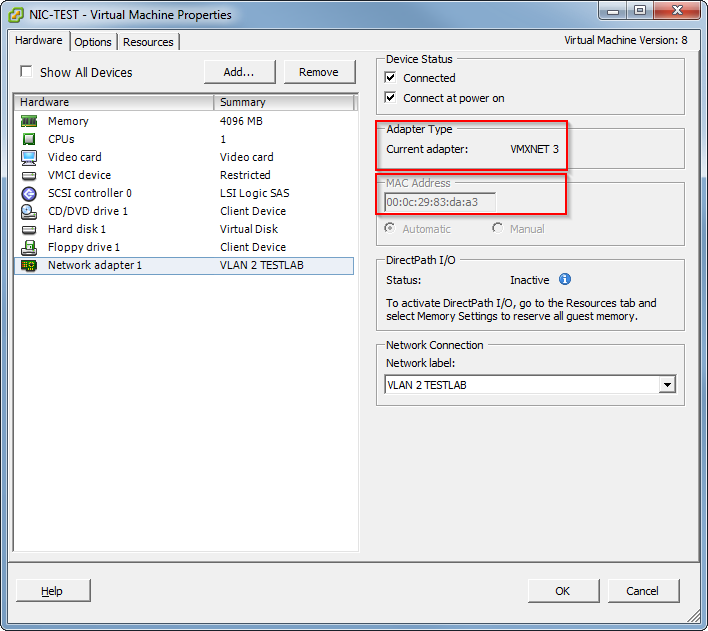
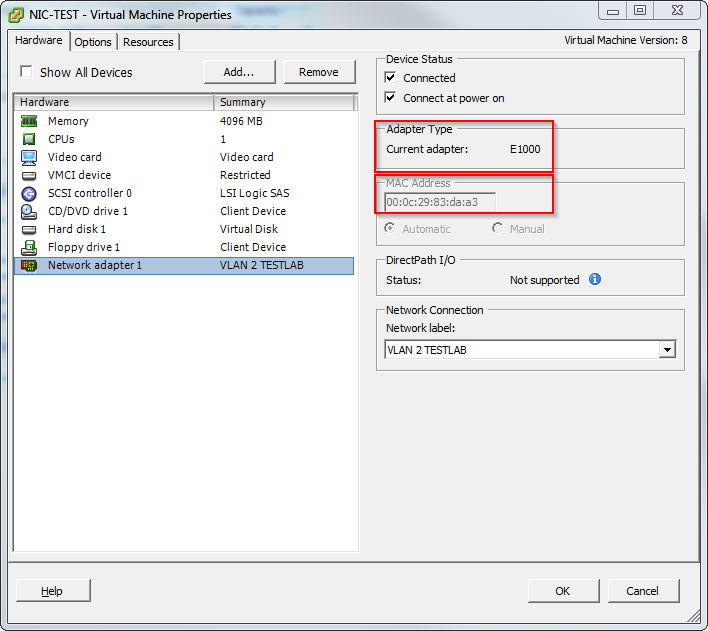
Today I found this neat PowerCLI One-liner in my Twitter timeline:

A nice side effect of this one-liner is, that the mac-address doesn’t change, as you can see in the screenshots.

Patrick Terlisten/ vcloudnine.de/ Creative Commons CC0

Patrick Terlisten/ vcloudnine.de/ Creative Commons CC0

Patrick Terlisten/ vcloudnine.de/ Creative Commons CC0

Patrick Terlisten/ vcloudnine.de/ Creative Commons CC0

Useful stuff about Nutanix

Nutanix was founded in 2009 and left the stealth mode in 2011. Their Virtual Computing Platform combines storage and computing resources in a building block scheme. Each appliance consists up to four nodes and local storage (SSD and rotating rust). At least three nodes are necessary to form a cluster. If you need more storage or compute resources, you can add more appliances, and thus nodes, to the cluster (scale out). Nutanix scales proportionately with cluster growth. The magic is not the hardware - it’s the software. The local storage resources of each appliance are passed to the Nutanix Controller VM (CVM). The CVM services I/O and storage to the VMs and is running on each node, regardless of the hypervisor. You can run VMware ESXi, Microsoft Hyper-V and KVM on the nodes. Although the Nutanix Distributed File System (NDFS) is stretched across all nodes, I/O for a VM is served by the local CVM. The storage can be presented via iSCSI, NFS or SMB3 to the hypervisor.

How to deploy Cisco CSR1000V & HP VSR1000 Virtual Service Router

In an earlier blog post I wrote a bit about virtual service routers. Now I want to show you how easily you can deploy a virtual service router in your lab. To do so I have downloaded the the HP VSR1000 Virtual Service Router and the Cisco Cloud Service Router 1000V. If you want to know how to download them, just read the mentioned blog post. Because both virtual service routers delivered as OVA, I can easily deploy them through the vSphere Client (sorry, no Web Client. It’s a standalone HP Micro Server without a vCenter). I will show an example on how to deploy the Cisco CSR1000V. That procedure is exactly the same for the HP VSR1000. The procedure is pretty straightforward. The screenshots are self-explanatory.

Virtual Service Router - An introduction

Today you can get nearly everything as a virtual appliance. So even a router. Usually virtual router appliances are used for the same purposes as physical router: Connecting different networks. A router is nothing more then a piece of hardware and software. Due to this fact a router can be easily deployed as a virtual appliance. So where do you find router typically? In you datacenter? Yes, but in a datacenter you will deal typically with layer-3 switches rather than a classical router. In you WAN? That’s much warmer. Think of all the CE router in the branch offices, or the router that is running at a SMB customer. Or the small linux VM with IPtables which secures a special VM on your hypervisor. Or public cloud deployments. But what’s the benefit of a virtual router?

HP 4 Gb Fibre Channel Pass-Thru Module for c-Class BladeSystem & 8 Gb SFP+ transceiver

TL;DR: The HP 4Gb Fibre Channel Pass-Thru Module is (as the name says) 4 Gb Fibre-Channel module. Even if HP delivers the module with 8 Gb SFP+ transceivers, the module can only provide a 4 Gb link. Don't make the same mistake as I did. Just because 8 Gb SFP + are included, it doesn't necessarily mean that the module provides an 8 Gb connection.

The HP 4Gb Fibre Channel Pass-Thru Module for c-Class BladeSystem (PN 403626-B21) is a interconnect module for the HP BladeSystem c-Class. It’s a simple pass-thru module, which provides a 1:1 non-switched, non-blocking paths between the server blade and a Fibre Channel Fabric. There are several Fibre Channel interconnect modules, like the Virtual Connect 8 Gb Fibre Channel modules (20 or 24 ports) or the Brocade and Cisco 8Gb SAN Switches for HP BladeSystem c-Class. The pass-thru modules is a good choice if the customer has a good Fibre Channel infrastructure and the number of servers is manageable. It’s much cheaper than the Virtual Connect Fibre Channel modules (which require a Virtual Connect Ethernet module for management) or the Brocade or Cisco MDS Fibre Channel switches for HP BladeSystem c-Class. But it also has disadvantages. it only provides a 4 Gb Fibre Channel link! Even if HP delivers the modules with 8 Gb SFP+ transceivers, only a maximum of 4 Gb are possible. Neither the Quick Specs, nor the HP support could make a statement which SFP+ transceivers are included. That 8Gb SFP+ transceivers are included, was a chance finding. Unfortunately HP doesn’t provide a 8 Gb pass-thru module and the 4 Gb pass-thru module doesn’t support 8 Gb connections, even with 8 Gb SFP+ transceivers. If you need a 8 Gb connection you have to use Virtual Connect or Brocade or Cisco MDS Fibre Channel switches.

HP Service Pack for ProLiant 2014.02

After nearly 5 months released HP a new version of the HP Service Pack for ProLiant (SPP). The latest release is now 2014.02.

What is the HP Service Pack for ProLiant?

Back in the days there were two software products to update a ProLiant server with the latest firmware, drivers & agents.

  • HP Smart Update Firmware DVD
  • HP ProLiant Support Pack

the first one was bootable for offline firmware, and also contained Online ROM flash components for online firmware updates. The second was to install/ update the latest drivers and agents. The HP Service Pack for ProLiants (SPP) replaces both. The SPP is a comprehensive software and it’s delivered as a ISO. It can be burned to DVD, installed on a USB stick or extracted and run from the directory. The SPP used the [HP Smart Update Manager (SUM)](The HP SUM can be used as a standalone product.) as deployment tool. The HP SUM can be used as a standalone product.

DataCore SANsymphony-V 9.0 PSP4 Update 3 – Update recommended

About two weeks after the release of DataCore SANsymphony-V 9.0 PSP4 Update 2, DataCore announces Update 3. This is a really short release cycle… DataCore fixed three issues in Update 3. This is an excerpt from the release notes:

Problem: SANsymphony 9.0 PSP4 Update2 failed to update configurations with shared pools on DataCore Servers running SANsymphony 9.0 PSP3, PSP3 U1 or PSP3 U2. Cause: An upgrade script run during installation expected a cmdlet parameter that wasn‟t supported in these versions. Resolution: Updated the script to no longer rely on this parameter.

Fibre Channel: ISL, ISL trunking & FSPF

Note

This article is a bit Brocade-minded, especially with regard to the terminology.

Redundant paths in a network are always a curse. Always? Not always. It depends on the protocol and the kind of network. In a Ethernet network you have Spanning Tree which eliminates redundant paths and builds a loop free network. What about redundant paths in a storage network? When iSCSI and NFS is used, then usually TCP/IP is used on top of Ethernet. Fibre Channel manages redundant paths a bit different. There’s nothing like Spanning Tree. Redundant paths are nothing fancy. They are just there and they are used.