
Software

Using HP StoreOnce as target for Windows Server Backup (WSB)

Some days ago, I blogged about the new HP StoreOnce software release 3.13.0. This release included several fixes. One fix wasn’t mentioned by me, although it’s interesting.

  • Fixed issue where Windows 2012 R2 built-in native backup was not supported with 3.12.x software (BZ 61232)

Windows Server Backup (WSB) is part of Windows Server since Windows Server 2008. WSB can create bare metal backups and recover those backups. The same applies to system state backups, file level backups, Hyper-V VMs, Exchange etc. Very handy for small environmens. Backup can be stored on disk or on a file share. With Server 2012, the file share must be SMB3 capable. So if it’s not a Windows file server, the NAS that offers the file share has to be SMB3 capable. This doesn’t apply to Windows Server 2008 (R2).
PernixData Architect Software

With the general availability of PernixData FVP 3.1, PernixData released the first version of PernixData Architect.

One of the biggest problems today is, that management tools are often focused on deployment and monitoring of applications or infrastructure. This doesn’t lead to a holistic view over applications and related data center infrastructure. You have to monitor at several points within the application stack and even then, you won’t get a holistic view. Without proper information, you can’t make proper decisions. At this point, PernixData Architect comes into play.

Outlook license requirements for Exchange features

Microsoft Exchange Server licensing is rather simple. You can choose between two Exchange licenses:

  • Standard (up to 5 mailbox databases)
  • Enterprise (up to 100 mailbox databases)

Standard and Enterprise only differ in the number of supported databases! Feedl free to use Exchange DAG with Exchange Standard and Windows Server Standard! To license your clients, you have to purchase a Client Access License (CAL) for each user or device that accesses your Exchange server environment. There are two types of CALs:

DataCore mirrored virtual disks full recovery fails repeatedly

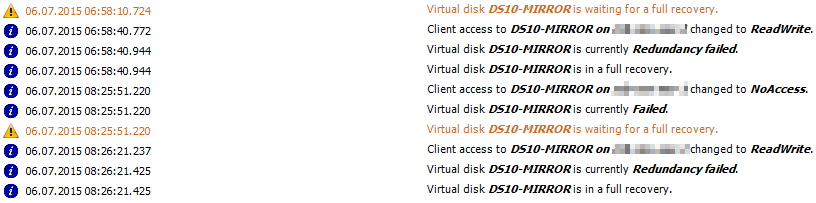
Last sunday a customer suffered a power outage for a few hours. Unfortunately the DataCore Storage Server in the affected datacenter weren’t shutdown and therefore it crashed. After the power was back, the Storage Server was started and the recoveries for the mirrored virtual disks started. Hours later, three mirrored virtual disks were still running full recoveries and the recovery for each of them failed repeatedly.

Patrick Terlisten/ vcloudnine.de/ Creative Commons CC0

Patrick Terlisten/ vcloudnine.de/ Creative Commons CC0

Windows guest customization fails after cloning a VM

Last week I got a call from a customer. The customer has tried to deploy new Citrix XenApp servers, and because the VMware template was a bit outdated, he tried to clone a provisioned and running Citrix XenApp VM. During this, the customer applied a guest customization specification to customize the guest OS (IP address, hostname etc). Until this point everything was fine. But after the clone process, the guest customization started, but never finished.

HP Service Pack for ProLiant 2015.04

Some weeks ago, HP has published an updated version of their HP Service Pack for ProLiant (SPP). The SPP 2015.04.0 has added support for

  • new HP ProLiant servers and options,
  • support for Red Had Enterprise Linux 6.6, SUSE Linux Enterprise Server 12, VMware vSphere 5.5 U2 and (of course) VMware vSphere 6.0,
  • HP Smart Update Manager v7.2.0 was added,
  • the HP USB Key Utility for Windows v2.0.0.0 can now handle downloads greater than 4GB (important, because this release may not fit on a standard DVD media…)
  • select Linux firmware components is now available in rpm format

In addition, the SPP covers two important customer advisories:

Safe (or safer) than backup to tape: HP StoreOnce

When talking to SMB customers, most of them don’t want to talk about their backup strategy. It’s paradox: They know that data loss can ruin their business, but they don’t want to invest money into a fully tested recovery concept (I try to avoid the word “backup concept” - Recovery is the key). Because of tight budgets and lacking knowledge, many customers use traditional concepts in a virtualized world. This often ends  in traditional backup applications with agents deployed into guest OS, and backups that are written to tape (or worse: On USB disks). If you ask a customer “Why do you store your data on tape?”, only a few argue with costs per GB or performance. Most the customer argue with something like

Publishing Outlook Web Access with Microsoft Web Application Proxy (WAP)

Microsoft has introduced the Web Application Proxy (WAP) with Windows Server 2012 R2 and has it positioned as a replacement for Microsoft User Access Gateway (UAG), Thread Management Gateway (TMG) and IIS Application Request Routung (ARR). WAP ist tightly bound to the Active Directory Federation Services (AD FS) role. WAP can be used

  • pre-authenticate access to published web applications, and
  • it can function as an AD FS proxy

The AD FS proxy role was removed in Windows Server 2012 R2 and it’s replaced by the WAP role. Because WAP stores its configuration in the AD FS, you must deploy AD FS in your organization. The server, that hosts the WAP, has no local configuration. This allows you to deploy additional WAP servers to create a cluster deployment. The additional servers get their configuration from the AD FS.

Shady upgrade path for NetApp ONTAP 7-Mode to cDOT

NetApp has offered Data ONTAP for some time in two flavours:

  • 7-Mode
  • Clustered Data ONTAP (cDOT)

With cDOT, NetApp has rewritten ONTAP nearly from scratch. The aim was to create an Storage OS, that leverages scale-out architecture and storage virtualization techniques, as well as providing non-disruptive operations. NetApp has needed some release cycles to get cDOT at that point, where it provides all features that customers know from 7-Mode. With Data ONTAP 8.3, NetApp has reached this point. Even Metrocluster is now supported. That’s a huge improvement and I’m glad that NetApp has made it. But NetApp wasted no time in cutting off old habits: With ONTAP 8.3, 7-Mode is no longer offered. Okay, no big deal. Customers can migrate from 7-Mode to cDOT. Yes, indeed. But it’s not that easy as you maybe think.

Importance of client-side proxy settings in Exchange 2013 environments

There is an advantage, if you solves problems: You can learn something. I’m currently migrate a small Exchange 2007 environment to Exchange 2013. The first thing I learnt was, that IT staff still uses their own accounts for administration, and sometimes they assign administrator rights to users for testing and troubleshooting purposes. This can be a problem, as I described in my last posting. Today I learnt something different: Sometimes it’s the little things that bring you to despair.